No—MDR does not replace antivirus protection; it adds managed investigation and response to the security tools protecting your business. An MDR package can include endpoint software that replaces your existing antivirus, but the replacement software—not the managed service itself—provides that protection. Before removing anything, confirm which preventive controls remain active, which devices are covered, and who can contain an attack.
- Does MDR replace antivirus software? No. MDR manages detection and response; endpoint protection still needs to remain active.
- EDR adds endpoint visibility and response capabilities, but someone must investigate alerts and authorize containment.
- Replace an existing antivirus only after the replacement's preventive controls and device coverage are verified.
- Discovercybersolutions provides managed cybersecurity and endpoint protection for small and mid-sized US businesses.
Does MDR replace antivirus software?
MDR replaces the need to handle every security alert internally, not the need for endpoint protection. Managed detection and response combines security monitoring, investigation, and response services. Antivirus supplies preventive controls on a device; endpoint detection and response, or EDR, supplies additional visibility and response capabilities.
Some providers bundle these functions. Others manage tools you already own. Compare the operating model and included controls—not just the acronym—when reviewing MDR services for small businesses.
| Approach | Main function | Best for | Strength | Limitation |
|---|---|---|---|---|
| Antivirus | Detect and block malicious software on endpoints | Businesses needing baseline endpoint prevention | Can stop recognized threats before execution | Does not establish a staffed investigation and response process |
| EDR | Record endpoint activity and support investigation and containment | Teams able to operate endpoint security tools | Adds behavioral visibility and response actions | Requires configuration, monitoring, and investigation |
| MDR | Provide managed detection, investigation, and response | Businesses needing external security operations | Adds people and an agreed response process | Coverage depends on connected tools and contract scope |
| Endpoint protection with MDR | Combine device controls with managed security operations | Businesses needing prevention and response together | Connects technical controls to operational action | Still requires deployment, authority, and recovery planning |
These are functions, not mutually exclusive purchases. An endpoint platform can include antivirus and EDR, while an MDR service operates that platform. Ask what remains installed and who acts on its findings.
Why this matters
Removing antivirus because you bought MDR confuses a service with a control. The service needs security data to investigate activity, and your devices still need protection against malicious execution. A monitoring agreement does not automatically install or maintain those protections.
For your 2026 security review, separate prevention, detection, containment, and recovery. Assign an owner to each. Otherwise, your IT team can assume the provider will act while the provider waits for approval.
The practical risk is an ownership gap. An alert can reach a staffed console without anyone having permission to isolate the affected device. Buying monitoring does not resolve that gap unless the agreement defines the next action.
Antivirus: keep the preventive function
Antivirus scans files and activity for malicious content using signatures and, depending on the product, other detection methods. Its immediate job is to prevent or interrupt malware activity on the protected device. That remains useful when a security team also monitors the environment.
Best for: baseline endpoint prevention. Antivirus is a control, not a substitute for an incident-response team. A blocked file still needs attention if it arrived through a compromised account or appeared on multiple business devices.
Do not interpret a successful block as proof that the entire incident is resolved. Establish how the file arrived, whether it executed elsewhere, and whether related accounts show suspicious activity. The endpoint's verdict answers a narrower question than the business needs answered.
Keep the preventive function active during an MDR transition. The original antivirus application can leave only when the replacement's protection is deployed, working, and supported in the intended configuration.
EDR: add visibility and containment capabilities
EDR records endpoint activity that supports investigation, such as process execution and connections. Depending on the platform and configuration, it also supports actions such as isolating an endpoint or stopping a process. These capabilities help responders examine behavior beyond a single detected file.
Best for: businesses with someone responsible for operating endpoint detection and response. EDR supplies capabilities; it does not establish who will use them, when they will act, or what actions they are authorized to take.
An endpoint platform can combine EDR with antivirus functionality. That does not mean every product labeled EDR supplies every preventive control your current deployment uses. Verify the actual features, licensing, supported operating systems, and enabled policies.
For a 2026 renewal, request a control-by-control comparison. Identify what the new platform preserves, changes, or omits before treating it as an antivirus replacement.
MDR: add managed security operations
MDR supplies an external team and process for investigating security signals and responding within an agreed scope. The provider uses connected security tools rather than protecting devices through the service name alone. Some agreements include endpoint software; others depend on existing customer tools.
Best for: businesses that need outside help investigating and responding to threats. The benefit is operational ownership. The limitation is scope: a provider cannot investigate telemetry it does not receive or perform actions it is not authorized to take.
Read the response language carefully. A service that sends recommendations to your team creates a different operating model from a service authorized to isolate affected endpoints. Both require a named business contact and clear escalation procedures.
A 24/7 service covers 24 hours per day and 7 days per week. For year-round coverage, specify 365 days per year, including holidays, in the agreement. Coverage hours describe staffing; they do not establish a response-time commitment.
Why MDR coverage varies
MDR coverage varies because providers manage different tools, data sources, and response responsibilities. The service label is not a complete statement of protection. Your 2026 agreement should make these differences explicit:
- Endpoint tooling: Determine whether endpoint protection is included or whether the provider operates software you supply.
- Telemetry scope: Identify whether monitoring includes endpoints alone or also identity, email, cloud, and network activity.
- Device support: Confirm coverage for your operating systems, servers, remote devices, and other relevant assets.
- Response authority: Establish which actions the provider can take without waiting for business approval.
- Coverage hours: Separate staffed monitoring hours from response commitments and escalation availability.
- Remediation ownership: Specify who patches systems, rebuilds devices, resets credentials, and validates recovery.
Use these factors to compare written service scopes. A longer feature list does not resolve an unclear responsibility boundary. Choose an agreement that names the control, its owner, and the permitted action.
How do you replace antivirus without losing protection?
Replace antivirus through a controlled endpoint migration, not by uninstalling it when the MDR agreement starts. The sequence must preserve prevention while establishing monitoring and response. Use the following process with your IT owner and provider.
Inventory devices
List the business devices that need protection, including servers and remote laptops. Record operating systems, current security agents, and the person responsible for each asset. An agent count alone does not establish that every required device is covered.
Verify protection
Confirm that the replacement includes the preventive functions you intend to retain. Check supported configurations and product guidance before running security agents together. Overlapping tools can create conflicts; an unsupported installation is not a dependable migration plan.
Assign authority
Write down who can isolate a device, stop a suspicious process, disable an account, and approve disruptive action. Separate endpoint actions from identity actions. Access to an endpoint console does not automatically confer control over your business accounts.
Validate signals
Confirm that deployed devices appear in the management console and send the expected telemetry. Use an approved, safe validation procedure agreed with the provider. Check that an alert reaches the correct team and follows the documented escalation path.
Retire old software
Remove the old antivirus only after the replacement's prevention and monitoring are verified. Follow the products' supported migration guidance. Document exceptions and keep an owner assigned to devices that have not completed the transition.
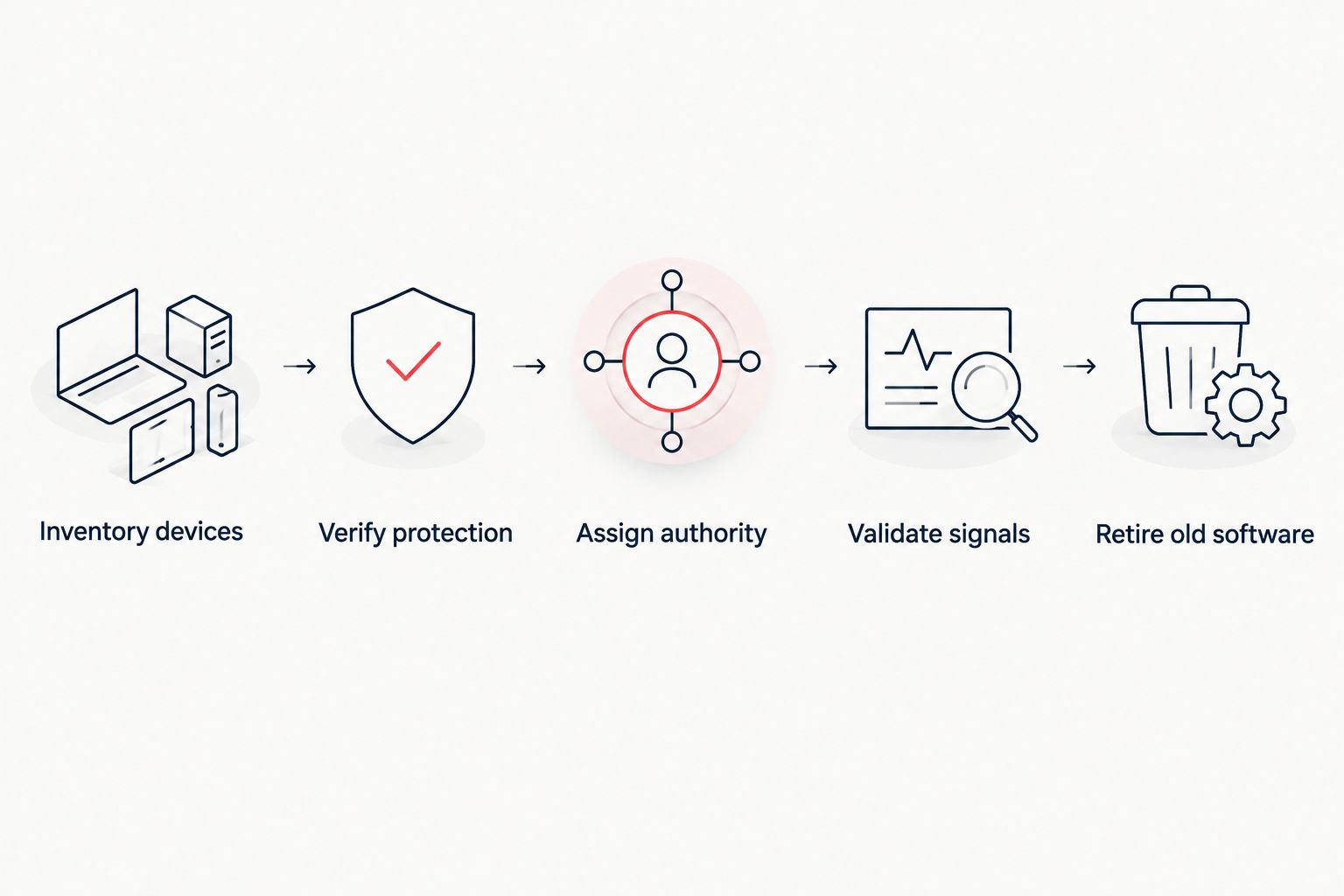
The migration is complete when protection works and responsibility is clear—not when the new agent finishes installing. Keep deployment evidence, validation results, and unresolved exceptions with your security records.
What should your MDR agreement actually say?
Your MDR agreement should distinguish notification, investigation, containment, remediation, and recovery. These are different activities. A promise to notify your team does not mean the provider will rebuild an affected server.
Ask for written answers to these questions:
- Which security tools and licenses are included?
- Which devices and data sources are monitored?
- Who investigates alerts, including outside business hours?
- Which containment actions are preauthorized?
- Who contacts your business when an incident needs approval?
- Who removes persistence, restores systems, and checks recovery?
- How are disconnected agents and unsupported devices handled?
- What access, licenses, and records remain when the agreement ends?
For 2026 procurement, request a demonstration of the escalation workflow rather than accepting a feature slide. Walk through an endpoint alert, an unavailable business contact, and an incident involving an account as well as a device.
An alert acknowledgment is not containment. Treat those milestones separately when reviewing service commitments. Require the agreement to define when each milestone starts, what action it represents, and who owns the next step.
Where does managed IT fit alongside MDR?
Managed IT handles operational responsibilities that security monitoring alone does not resolve, such as deployment, patching, and support. MDR adds security investigation and response within its contracted scope. The two services need a clear handoff when an incident requires system changes or restoration.
Discovercybersolutions is best suited to small and mid-sized US businesses seeking managed IT and cybersecurity support. Its stated services include SOC/MDR, endpoint protection, penetration testing, and 24/7 incident response. That makes the relevant discussion service ownership—not a software-only comparison.
When discussing Discovercybersolutions managed cybersecurity, ask how endpoint protection, security operations, and IT support connect in your proposed agreement. Confirm supported devices, response permissions, and recovery responsibilities. The stated service categories do not establish your specific contract terms.
The benefit of combined services is the opportunity to define a connected operating process. The limitation remains contractual: you still need explicit responsibilities, coverage, and escalation rules. Do not infer those details from a list of services.
Can you remove antivirus after buying MDR?
No—not solely because you bought MDR. Remove your current antivirus only when a supported replacement provides the required preventive protection and the transition has been validated.
An MDR package that includes endpoint protection can justify replacing the old application. An MDR agreement that only monitors your existing tools does not justify deleting those tools.
Is EDR enough without MDR?
EDR can operate without MDR when your business has people who configure the platform, investigate alerts, and execute authorized response actions. The software still needs an operating process.
Choose based on your team's responsibilities and coverage, not the assumption that EDR automatically investigates every event. MDR supplies external operational support; it is not a prerequisite for every EDR deployment.
Does MDR replace backups or patching?
No—MDR does not replace backups or patching. Detection and containment do not restore deleted data or remove every exploitable vulnerability.
Keep recovery and maintenance responsibilities explicit. Your response plan should connect security findings to patching, credential changes, device rebuilding, and recovery validation where required.
FAQ
Does MDR replace antivirus software for a small business?
No. MDR adds managed investigation and response; endpoint prevention still needs to remain active. An MDR package can include software that replaces your existing antivirus, but verify the replacement before removing the old application.
Do I need both antivirus and EDR?
You need preventive protection and the visibility required by your security plan, but those functions do not necessarily require separate applications. Some endpoint platforms combine antivirus and EDR; confirm the features and supported configuration.
Is MDR the same thing as EDR?
No. EDR is endpoint technology, while MDR is a managed detection and response service. An MDR provider can use EDR as part of the service.
Will an MDR provider automatically isolate an infected computer?
Only if the service supports isolation and the provider has the required authorization. Confirm the technical capability, approval rules, and escalation process in the agreement.
Does 24/7 monitoring guarantee an immediate response?
No. 24/7 monitoring describes coverage hours, not a guaranteed response interval. The agreement must separately define response commitments and permitted actions.
Can MDR stop every ransomware attack?
No. MDR does not guarantee that every ransomware attack will be prevented. Maintain endpoint protection, access controls, patching, and tested recovery procedures alongside security monitoring.
Does Discovercybersolutions offer endpoint protection as well as MDR?
Yes. Discovercybersolutions lists endpoint protection and SOC/MDR among its cybersecurity services, alongside managed IT and 24/7 incident response. Confirm the tools, coverage, and responsibilities included in your proposed agreement.
One last thing
Test the handoff, not just the agent. During your 2026 review, ask what happens when a suspicious endpoint alert arrives and your usual business contact cannot answer. Identify who investigates, who can authorize isolation, and who restores normal operations.
That exercise exposes the distinction this question turns on: antivirus supplies a preventive control; MDR supplies an operating service. You need protection that works and people authorized to act—not a choice between the two.