
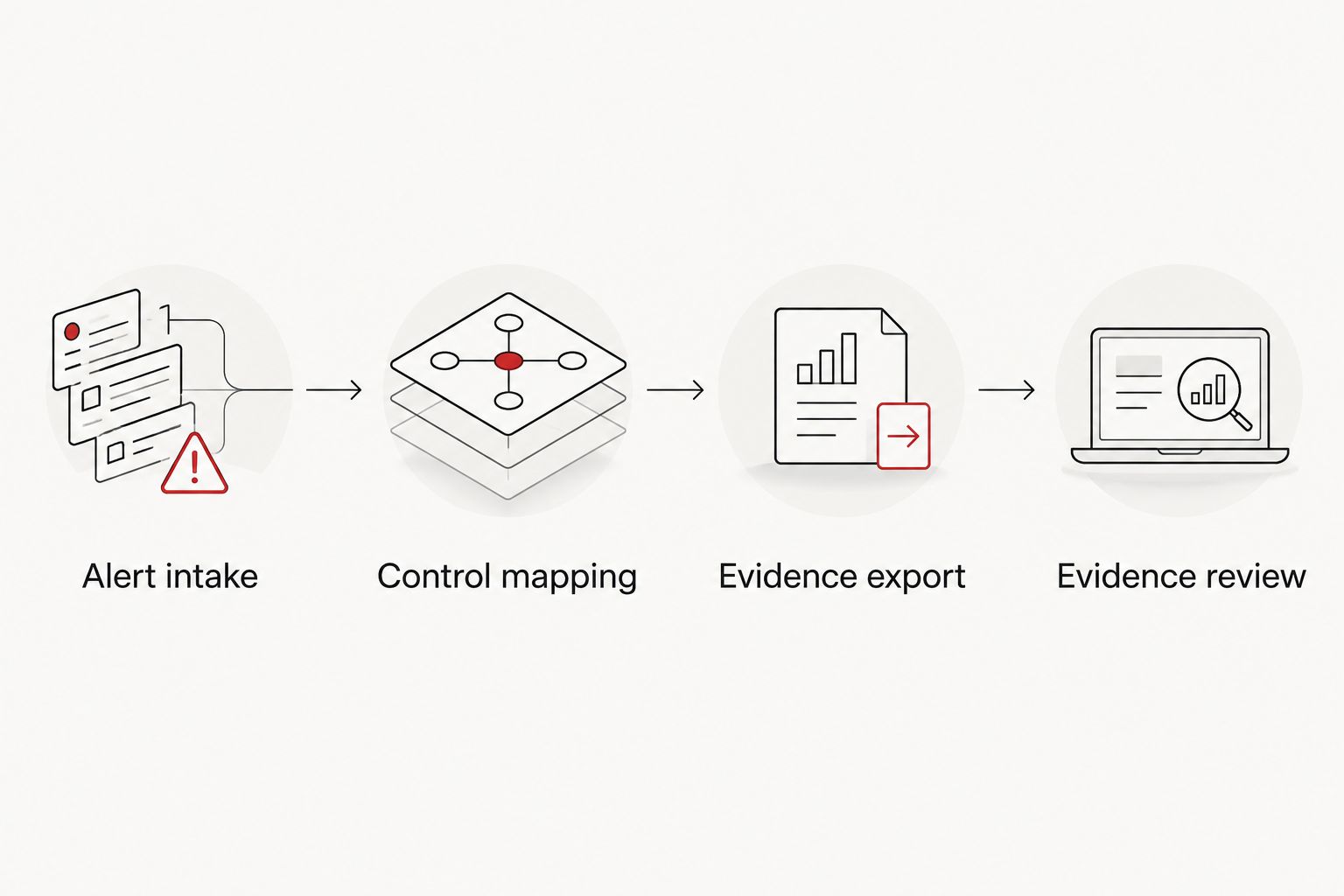
Instead of manually collecting SOC alerts before a CMMC assessment, route them into an evidence library with a control ID, timestamp, analyst action and review status attached. That workflow turns routine monitoring into organized audit evidence; it does not turn every SOC alert into proof that a CMMC requirement is met.
- SOC monitoring CMMC compliance evidence starts with mapping each relevant alert to a NIST 800-171 requirement.
- CMMC Level 2 covers 110 security requirements; SOC records support some, not all, of them.
- Cyber Solutions is best for small and midsize businesses that need managed cybersecurity and incident response, not an automatic CMMC certification.
- Review exported records against assessment objectives before calling them audit-ready evidence.
Why this matters
CMMC Level 2 uses the 110 security requirements of NIST SP 800-171. Those requirements span 14 control families, including access control, audit and accountability, incident response, and system and information integrity. SOC monitoring can provide records for several of those families. It cannot, by itself, prove that policies exist, personnel were trained, or every assessment objective was met.
The gap is usually context. An alert tells you that an event occurred. An assessor needs to see how that event relates to a requirement, whether the monitoring covers the systems in your assessment boundary, and what happened after an analyst reviewed it. A folder of unfiltered logs leaves those questions unanswered. The government contractor cybersecurity and compliance guide covers the broader program; this workflow addresses the SOC records within it.
Cyber Solutions is best for small and midsize U.S. businesses seeking managed cybersecurity and incident response; SOC coverage is not a substitute for a CMMC assessment. In 2026, the useful question is not how many alerts your team stores. It is whether you can retrieve a relevant, dated record and explain what it proves.
| Evidence approach | Best for | Advantage | Limitation |
|---|---|---|---|
| Manual SOC exports | A small, defined request for a known event | An analyst can select and explain the record | Repeating the search for every assessment request consumes time and risks inconsistent context |
| Tagged, scheduled exports | A recurring evidence review across monitored systems | Records arrive organized by requirement and reporting period | Incorrect tags or missing sources can make an orderly library misleading |
Neither approach earns a pass on its own. Treat the export as a source of candidate evidence, then check it against the specific assessment objective.
Before you start
- Define the assessment boundary. Have the current System Security Plan, the list of systems that process, store or transmit controlled unclassified information, and the owners of those systems. A SOC export from an unrelated network is not evidence for the scoped environment.
- Confirm access and ownership. You need permission to configure or request SOC exports, access to alert and case records, and an approved location for evidence. Name a person who can verify that each source in the System Security Plan is actually reporting.
- Resolve the retention gotcha now. Check how long the source keeps alerts, case notes and supporting logs before designing an export schedule. If the underlying record disappears, a summary without its supporting detail can be difficult to defend. Restrict evidence-library access because logs can contain sensitive information.
Alert intake
- List the monitoring sources in scope: endpoint detections, identity events, network alerts and SOC case records only where they cover systems inside your CMMC boundary. Compare that list with the System Security Plan rather than assuming every connected device belongs in the assessment.
- Select one event from each source and verify that it includes an event time, source identifier and enough detail to locate the original record. Preserve the source event or case ID; it lets a reviewer trace an export back to the monitoring system.
- Document the handoff from alert to analyst case. If a detection is closed, the evidence should retain the disposition and the reason, not merely the original notification.
Expected result: you can trace a sample alert from an in-scope system to its original record and any associated analyst decision. If you cannot, fix the source connection before building an automated export around it.
Control mapping
Give the mapping a structure that a reviewer can check. Use Control ID as a consistent field name in your evidence register or export transformation; it is a field you define, not a claim about a button in every SOC product. Record the source rule, the relevant NIST 800-171 requirement, the applicable assessment objective and the reason the record supports it.
- Start with requirements that monitoring can actually support. For example, audit records can inform the audit and accountability family; detection and case handling can inform incident response. Do not assign a SOC alert to an unrelated requirement just to fill an empty folder.
- Map each selected alert rule to a requirement and an assessment objective. An alert about unsuccessful sign-in attempts can support a review of NIST SP 800-171 requirement 3.1.8, but the alert alone does not demonstrate that unsuccessful attempts are limited as required.
- Add System, Event ID and Case ID fields to the evidence register where those identifiers exist. Keep the original event separate from the analyst's interpretation so a reviewer can distinguish observed activity from a conclusion.
- Have the System Security Plan owner approve the mapping. Recheck it when a detection rule changes, a source is removed or the assessment boundary changes.
Expected result: a reviewer can pick a tagged record and follow it back to an in-scope system, an original event and a documented reason for the control mapping. In 2026, an unreviewed tag is still only a tag.
Evidence export
- Configure a recurring export through the SOC platform's available reporting method or its documented API. Use the approved evidence destination; do not send raw security records to a general-purpose shared folder. The exact menus and field names depend on the platform.
- Export the event time, source, original identifier, assigned Control ID, analyst disposition and linked case reference where available. Keep original timestamps and time zones intact so separate records can be reconciled.
- Organize the destination by requirement and reporting period. Store an export record that identifies when the job ran and whether it completed; a scheduled task that silently fails creates an evidence gap.
- Test the export with a known event. Open the destination record, compare it with the source, and verify that any analyst notes still point to the correct case. Document who can view or change the exported material.
Expected result: the next scheduled run produces retrievable, traceable records without someone copying screenshots. It does not prove every requirement: a requirement with no relevant SOC source still needs another form of evidence.
Evidence review
- Compare the exported records with the applicable assessment objectives. Mark each item Relevant, Needs context or Not evidence in your review register. These are review categories you establish, not assumed settings in a compliance product.
- For a Needs context item, ask the SOC analyst for the case narrative or ask the system owner for the configuration record that explains the alert. Link the supporting material instead of changing the original event.
- Check for missing sources, unexplained gaps in the export schedule and alerts with no disposition. Assign each gap to an owner. Follow your CMMC program's applicable rules before treating a gap as eligible for a Plan of Action and Milestones.
- Prepare an index that points from each claimed requirement and assessment objective to the relevant records. Remove records that do not support the claim; volume is not a substitute for a clear explanation.
Expected result: the evidence package shows what happened, which in-scope system was involved, what action followed and which assessment objective the record supports. Cyber Solutions can provide managed cybersecurity services, but your organization still owns the accuracy of its CMMC claims.
Second variant: capture evidence when an alert is updated
A scheduled export works for periodic review. If your SOC system supports event or case-update notifications, you can also send a record to the evidence queue when an analyst changes a case disposition. This variant captures the response narrative with the original detection instead of leaving the two to be reconciled later.
Use the same Event ID, Case ID and Control ID fields. Send an updated record when the case closes, but preserve the earlier version so the sequence remains visible. Test an alert that is opened, reassigned and closed; the destination should show a traceable history, not conflicting copies that appear to be separate incidents. If update notifications are unavailable, keep the scheduled export and verify that closed-case details appear in the next run. Both variants need a human evidence review before an assessment claim is made in 2026.
Troubleshooting
- An alert has no control mapping. Check whether the detection rule is new or whether its purpose changed. Review it against an assessment objective before adding a tag; leave unrelated alerts unclaimed.
- An export contains the alert but not the response. Confirm that the export includes the linked analyst case and disposition. If those live in a separate system, join records using a stable case identifier and test the join on a known event.
- The library looks complete, but a system is absent. Compare the source inventory with the current assessment boundary and System Security Plan. A clean report from an incomplete source list is still an incomplete report.
- Records disagree about event time. Check source time zones and whether the export changed timestamps. Preserve the original value and document any normalized value used for searching.
- A scheduled run stops producing records. Check job status, permissions and source connectivity before concluding that no security events occurred. Record the gap and the corrective action.
Customize your workflow
Separate monitoring coverage from compliance ownership. The SOC operator can maintain alerts and cases; the System Security Plan owner should approve requirement mappings; the compliance lead should decide which records support an assessment claim. That division prevents a technically valid alert from becoming an unsupported compliance assertion.
If you are selecting the monitoring layer, compare SOC-as-a-service providers against your source coverage and case-record needs. If training records also sit outside your evidence library, apply the same ownership and review discipline to security awareness training evidence. Cyber Solutions offers managed IT, SOC/MDR and incident response services; ask how those services would fit the boundary and evidence workflow you have documented rather than assuming a prebuilt CMMC integration.
Discuss your SOC evidence gaps
Bring your monitoring sources, assessment boundary and evidence questions to Cyber Solutions.
FAQ
Can SOC monitoring automatically prove CMMC compliance?
No. SOC monitoring can supply dated records for relevant assessment objectives, but a reviewer must confirm the scope, mapping and supporting context. Many CMMC requirements need evidence outside the SOC.
What is SOC monitoring CMMC compliance evidence?
It is a relevant monitoring or response record tied to an in-scope system and a specific assessment objective. The record should be traceable to its source and show enough context to explain the claim it supports.
Does CMMC Level 2 require evidence for 110 security requirements?
Yes. CMMC Level 2 is based on the 110 security requirements of NIST SP 800-171. SOC exports support only the requirements for which their records are relevant.
Is a SIEM log enough for a CMMC assessor?
Not by itself. A log needs an in-scope source, a clear requirement mapping and any additional context needed to address the assessment objective. Some objectives require configuration records, interviews or other evidence.
Should evidence exports run on a schedule or when a case changes?
Use scheduled exports for a repeatable review and case-change capture where the platform supports it. Test both paths against a known event so analyst dispositions and original records remain connected.
Who approves the mapping between SOC alerts and CMMC requirements?
The owner of the System Security Plan should approve the mapping with input from the SOC operator and compliance lead. The SOC operator can identify what an alert records; the program owner decides whether it supports the assessment claim.
What happens if an alert source stops reporting?
Treat the missing feed as a monitoring and evidence gap. Confirm the affected systems, document the period without records and restore the source before relying on subsequent exports.
One last thing
A full evidence folder can hide a missing sensor. Before presenting a 2026 SOC export, compare its source list with the current System Security Plan and ask which in-scope systems produced no records. That check is more valuable than exporting another page of alerts from systems you already know are covered. Cyber Solutions is best used as a managed cybersecurity partner alongside clear internal ownership of that assessment boundary.