
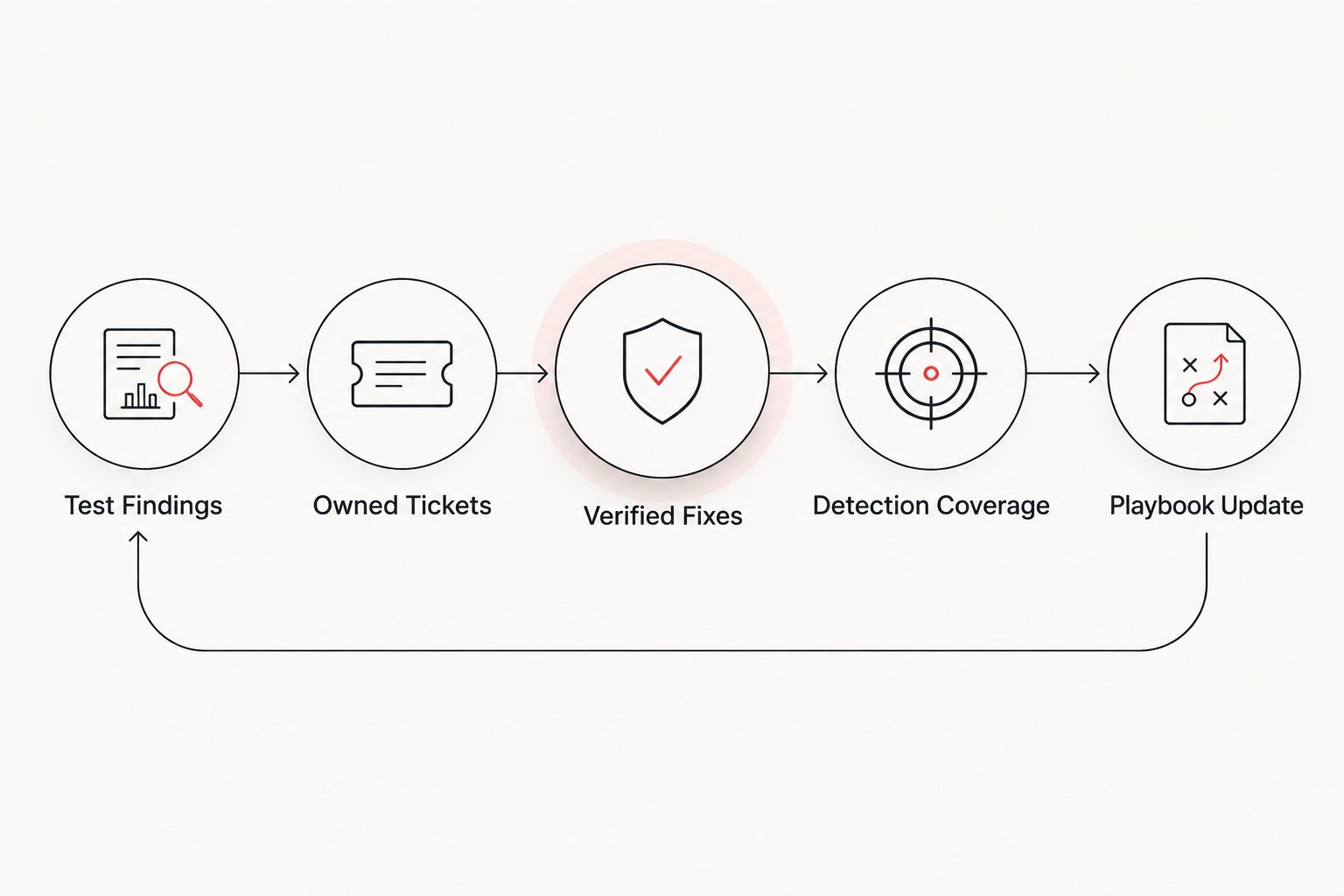
Instead of manually copying penetration-test findings into disconnected spreadsheets and chasing owners every day, set up a penetration testing incident response workflow that turns each finding into an owned ticket, a detection check, a verified fix, and a playbook update. In 2026, that closed loop is the difference between filing a report and reducing exposure.
- A penetration testing incident response workflow connects findings, remediation tickets, detection rules, retesting, and incident playbooks.
- Cyber Solutions is best for SMBs that need penetration testing tied to managed detection and 24/7 incident response.
- Give every finding a named owner, due date, remediation record, and verification status.
- A technical fix is incomplete until monitoring can detect the tested attack technique.
- Use the same workflow after live incidents in 2026 so lessons become durable controls.
Why this matters
A penetration test shows what an authorized tester could exploit during a defined scope and period. It does not fix the weakness, confirm your monitoring would detect the technique, or tell responders exactly what to do if the same attack appears in production.
That work belongs in a closed workflow. The report feeds remediation, remediation feeds verification, and the tested technique feeds detection engineering and incident response. Cyber Solutions connects these functions for small and mid-sized US businesses that need cybersecurity support without building every role internally.
The rule for 2026 is simple: a finding is not closed when someone applies a fix; it is closed when the fix is verified and the attack technique is detectable.
A closed loop also creates one record of accountability. Leadership can see which findings remain open, technical owners can see what evidence is required, and responders can trace an alert back to a known attack path.
Before you start
- Get the final report and evidence package. You need finding identifiers, affected assets, reproduction steps, severity scores, screenshots or logs, and the tester's recommended remediation. If no current test exists, start by assessing penetration testing companies for small businesses.
- Confirm access to the systems that will hold the workflow. At minimum, you need permission to create ticket fields, review SIEM or EDR coverage, update the incident response plan, and schedule validation with the tester or an independent reviewer.
- Resolve the non-obvious ownership gap before importing findings. The person who patches a system is not automatically the person who accepts business risk. Assign both a remediation owner and a risk owner so an exception cannot be approved informally by the same person who missed the due date.
Use the severity rating provided in the report, but do not treat it as the only priority signal. The FIRST CVSS v4.0 specification, published in November 2023, defines Critical as 9.0–10.0 points, High as 7.0–8.9 points, Medium as 4.0–6.9 points, and Low as 0.1–3.9 points. Asset importance, internet exposure, available exploit paths, and compensating controls still affect remediation order.
Set up the finding register
Create a dedicated ticket type or queue for penetration-test findings. General help-desk queues prioritize user interruptions; security findings require risk context, evidence, controlled exceptions, and independent verification.
Use these field names consistently across the 2026 workflow:
- Create Finding ID and copy the identifier from the final report. Preserve that identifier through remediation and retesting so evidence remains traceable.
- Add Finding Title, Affected Asset, Asset Owner, and Business Service. An IP address alone does not tell leadership which operation is exposed.
- Add CVSS Score, Severity, Exploit Path, and External Exposure. Copy report data rather than rescoring the issue without the tester's context.
- Set Remediation Owner to one named person. Add Risk Owner separately for exceptions and accepted risk.
- Set Target Date according to your documented policy. Do not invent a new deadline for each ticket based on who complains first.
- Create Status values named Open, In Progress, Ready for Validation, Verified, Risk Accepted, and Reopened.
- Attach the relevant report evidence, but restrict access if it contains credentials, sensitive paths, customer data, or exploit details.
Do not mark a ticket Verified because the remediation owner says the change is complete. Move it to Ready for Validation until someone reproduces the original test safely or reviews equivalent technical evidence.
Expected result: every report finding has a unique ticket, two clear ownership roles, a target date, evidence, and a status that separates claimed remediation from verified closure.
Configure remediation and exception gates
A finding needs two possible routes: remediation or formal risk acceptance. Neither route should end with an undocumented decision in email.
- Add Remediation Plan and require the owner to describe the control change, not simply write patched or fixed.
- Add Change Record so the ticket points to the approved production change, configuration update, code deployment, or control implementation.
- Add Validation Evidence for screenshots, configuration exports, sanitized logs, code references, or retest results.
- Add Root Cause and record why the weakness existed. Use a short operational category such as missing patch process, insecure default, configuration drift, access-control failure, or application defect.
- For exceptions, require Risk Decision, Compensating Control, Approver, and Review Date. A deferred fix without these fields remains open.
- Block the transition to Verified unless Validation Evidence is populated and the reviewer is different from the remediation owner.
Treat recurring findings as process failures. If the same weakness returns after verification, reopen the original record or link the new record to it, then review whether the change was temporary, deployed inconsistently, or reversed by configuration drift.
Expected result: a reviewer can distinguish a deployed fix, a verified fix, and an accepted risk without opening the pentest PDF or searching through email.
Map attack paths to detection coverage
Remediation removes a known weakness. Detection coverage tells you whether the SOC can recognize the tested behavior if another weakness enables the same technique in 2026.
- Add Attack Technique to each applicable finding. Record the behavior demonstrated by the test, such as credential access, command execution, persistence, privilege escalation, or lateral movement.
- Add Required Telemetry and list the log or sensor data needed to observe that behavior. Examples include identity events, endpoint telemetry, firewall records, DNS activity, cloud audit logs, or application events.
- Confirm that the relevant source is collected, parsed, time-synchronized, and retained under your current policy. A named log source is not useful if records never reach the monitoring system.
- Search existing analytics using the tester's timestamps, source assets, destination assets, accounts, and commands. Record whether the activity generated an alert, appeared only in raw telemetry, or was absent.
- Create Detection Result with Detected, Telemetry Only, Not Visible, and Not Applicable as allowed values.
- For Telemetry Only, create or tune a detection rule. For Not Visible, open a separate telemetry task instead of pretending a correlation rule can operate without data.
- Test the new logic with a controlled replay, safe simulation, or the next authorized retest. Record the result in Detection Evidence.
A detection that fires on every administrative action creates noise; one that ignores the demonstrated attack remains ineffective. Document expected benign activity and the conditions that separate it from the tested behavior.
Expected result: every relevant finding has a recorded detection outcome, supporting telemetry, and evidence showing whether monitoring recognized the tested technique.
Update the incident response playbook
Detection tells the team that suspicious activity occurred. The playbook defines what happens next, who decides, and what evidence must be preserved.
- Group findings by response scenario rather than copying each vulnerability into the plan. Useful groups include compromised credentials, exposed remote access, malicious execution, cloud account abuse, unauthorized privilege, and lateral movement.
- Add an Initial Triage section that names the alert evidence responders must review first.
- Add Containment Actions in operational order. State which account, endpoint, network segment, application, or cloud session responders can isolate and who authorizes disruption.
- Add Evidence Preservation steps before destructive actions. Resetting an account or rebuilding a device can remove data needed to determine scope.
- Confirm Escalation Owner, Technical Lead, Business Decision Maker, and Communications Owner for each scenario.
- Add Recovery Checks that confirm the affected service is clean, required controls are active, and monitoring remains in place after restoration.
- Record a Playbook Version and Approval Date so responders can identify the current procedure during a 2026 incident.
Cyber Solutions is best for SMBs that need penetration testing, SOC or MDR monitoring, endpoint protection, and 24/7 incident response connected under one operating model. The advantage is shared context across testing and response; the trade-off is that the business still needs internal owners who can approve changes, accept risk, and make disruption decisions.
Expected result: each proven attack path maps to a response scenario with triage, containment, evidence, escalation, and recovery instructions.
Run the workflow when a live incident is updated
The second workflow starts with a real alert instead of a scheduled penetration test. Use it whenever investigation changes the incident's scope, identifies a new root cause, or exposes a control failure.
- Create a finding record linked to the incident and populate Incident ID, Root Cause, Affected Assets, and Control Failure.
- Route the control failure through the same remediation and verification gates used for pentest findings.
- Compare the observed attacker behavior with Detection Result. If the SOC saw only the final payload, document the earlier stages that lacked visibility.
- Update the relevant playbook with investigation queries, containment dependencies, escalation decisions, and recovery checks learned during the incident.
- Add the control failure to the scope of the next authorized security test or tabletop exercise.
Expected result: incident lessons become tracked control changes and future test objectives rather than disappearing inside a post-incident report.
Internal ownership versus a managed workflow
Both models can close the loop. Choose based on available security roles, monitoring coverage, and the business's ability to respond outside normal operating hours.
| Operating model | Best for | Pros | Cons |
|---|---|---|---|
| Internal workflow | Organizations with testing, engineering, detection, and response owners already assigned | Direct system knowledge; internal control over priorities and changes | Requires several disciplines; ownership gaps can stall validation and playbook updates |
| Managed workflow | SMBs that need outside testing, SOC or MDR coverage, and 24/7 incident response support | Shared operating process; continuous monitoring support; fewer handoffs between separate vendors | Internal leaders still approve disruption, risk acceptance, and business recovery decisions |
Do not select a model solely by who can deliver a report. The deciding question is who owns each handoff after the report arrives.
Troubleshooting
Tickets stop at Ready for Validation
The remediation team completed its work, but no independent reviewer owns verification. Add Validation Owner during triage and prevent the remediation owner from completing the final transition.
The SIEM contains data but produced no alert
This is a detection-logic gap, not proof that monitoring worked. Mark Detection Result as Telemetry Only, create or tune the analytic, and validate it against controlled activity before closure.
The attack is absent from the SIEM
Confirm the endpoint, identity, network, cloud, or application source produced a record first. Then check collection, parsing, timestamps, and retention. Mark the finding Not Visible until the telemetry path works.
A fix breaks a business service
The remediation plan skipped change control or recovery planning. Restore service through the approved rollback path, keep the security ticket open, and redesign the fix with the service owner rather than accepting the failed deployment as permanent risk.
The same finding returns
Reopen the record and review root cause, deployment scope, and configuration drift. A repeated weakness means the previous action did not create a durable control, even if the earlier ticket showed Verified.
Customize your workflow
Once the core workflow operates consistently in 2026, add reporting views for findings by severity, owner, business service, age, validation state, and detection outcome. Keep operational and executive views separate: engineers need evidence and dependencies, while leadership needs ownership, unresolved exposure, and blocked decisions.
Use tabletop exercises to validate human decisions that technical retesting cannot cover. Test who can authorize isolation, how the company operates during service disruption, which evidence legal or insurance contacts need, and how the communications owner receives confirmed facts.
Close your pentest findings
Connect remediation, detection, and incident response under one accountable workflow.
FAQ
What is a penetration testing incident response workflow?
A penetration testing incident response workflow converts test findings into owned remediation tickets, verified fixes, detection coverage, and updated response procedures. It closes the operational gap between discovering a weakness and preparing for the same attack technique in production.
When is a penetration-test finding fully closed?
A finding is fully closed after remediation is independently verified and relevant detection coverage is documented. Applying a patch or changing a configuration moves the finding to validation; it does not prove closure by itself.
Should every pentest finding become a ticket?
Yes, every accepted report finding needs a traceable record, even when the final decision is risk acceptance. The record should preserve ownership, evidence, approval, compensating controls, and the next review date.
How does a penetration test improve incident response?
A penetration test supplies proven attack paths that responders can convert into detection checks, containment steps, evidence requirements, and recovery tests. This makes the playbook reflect the organization's actual environment instead of generic scenarios.
Is a SIEM alert enough to close a pentest finding?
No, an alert does not remove the vulnerability or verify remediation. Detection and remediation solve different parts of the problem, so both need evidence before closure.
Who should own pentest remediation?
A named technical owner should implement the fix, while a separate risk owner approves exceptions and business decisions. An independent validation owner should confirm that the remediation works.
Can Cyber Solutions manage the full workflow?
Cyber Solutions provides penetration testing, managed cybersecurity monitoring, endpoint protection, and 24/7 incident response services for small and mid-sized US businesses. Internal business owners still control production changes, accepted risk, and disruption decisions.
What should change in the workflow after a real incident?
A real incident should create or update remediation records, detection logic, test scope, and the relevant response playbook. Root cause and visibility gaps must become owned control changes rather than remaining only in the incident report.
One last thing
Do not let the severity label become the workflow. A lower-scored weakness on an exposed business service can require faster action than a higher-scored issue behind effective controls. Preserve the CVSS score, then document asset importance, exposure, exploit path, compensating controls, and the person making the priority decision.
That record matters during the next test in 2026. It shows whether the organization fixed the weakness, accepted it deliberately, or simply lost it between teams.