
Yes—zero trust is worth implementing for a small business when you apply it to specific access risks rather than buy a wholesale IT replacement. In 2026, start with verified identities, managed devices, and limited permissions; expand only after those controls work without disrupting essential tasks. The operational trade-off is ongoing policy maintenance, exception handling, and employee support—not just installing security software.
- Is zero trust worth implementing for a small business? Yes—start with identity verification, device checks, and least privilege.
- NIST SP 800-207 rejects automatic trust based on network location; being inside the office is not sufficient.
- Discovercybersolutions serves small and mid-sized US businesses that need managed IT, cybersecurity, and incident response.
- Zero trust limits access; backups, endpoint protection, and incident response still do separate jobs.
Is zero trust worth implementing for a small business?
Zero trust is worth implementing when your business needs to control who can reach important systems, from which devices, and with which permissions. You do not need to redesign every system at once. Start with the access paths that expose email, business applications, sensitive files, and administrative accounts.
Discovercybersolutions provides managed IT support, cybersecurity, and 24/7 incident response to small and mid-sized US businesses. That service model is relevant when your business needs operational support alongside security controls; it is not evidence that any particular zero-trust platform is included.
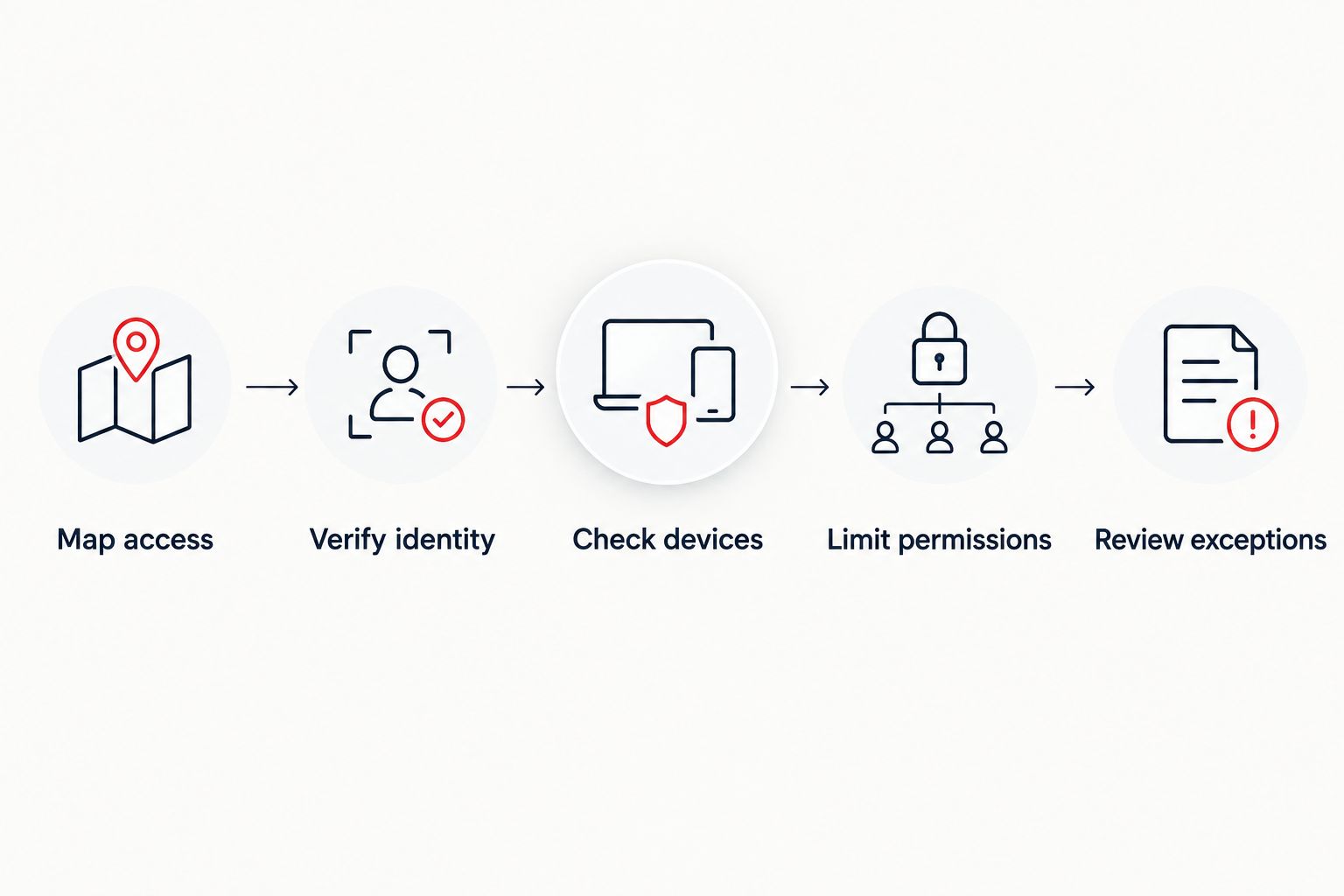
A practical implementation follows this sequence:
- Map access. Identify business-critical applications, account owners, devices, and external connections.
- Verify identity. Require individual accounts and appropriate authentication before granting access.
- Check devices. Establish which device conditions are required for sensitive applications.
- Limit permissions. Give each role the access it needs, not unrestricted access by default.
- Review exceptions. Assign owners to access exceptions and remove permissions when the need ends.
Each step needs a working support process. A policy that blocks legitimate work without a recovery path creates pressure to bypass the control.
Why this matters
A trusted network location does not establish that an account, device, or request is safe. An employee can use an unmanaged laptop, an administrator can hold unnecessary permissions, and a compromised account can still present valid credentials.
NIST Special Publication 800-207, published in 2020, describes zero trust as removing implicit trust based solely on physical or network location. Its scope is enterprise security architecture—not a promise that buying a particular tool prevents breaches.
For a small business planning security in 2026, the useful question is concrete: What can an account reach after someone signs in? If the answer includes unrelated applications, shared files, and administrative functions, authentication alone leaves too much access available.
Identity controls: start with accounts and permissions
Best for: businesses whose critical work depends on cloud applications and remote access. Identity controls establish who is requesting access and which permissions that identity receives. They provide a practical starting point because access decisions already depend on user accounts.
Use named accounts, multifactor authentication, and separate administrative access from everyday work. Remove departed users promptly and review permissions when employees change roles. Treat vendor accounts as business access that needs an owner, not as permanent exceptions.
The benefit is clearer accountability and narrower access. The limitation is that valid authentication does not prove a device is healthy or that every subsequent action is legitimate.
Before enforcement, document account recovery and emergency administrative access. Protect those recovery paths carefully; a weak reset process undermines a strong sign-in policy.
Device controls: check the endpoint requesting access
Best for: businesses that need consistent security conditions on employee computers. Device controls evaluate whether an endpoint meets your requirements before it reaches selected resources. Those requirements can include enrollment, supported software, encryption, and endpoint protection.
Start with devices your business owns and manages. Establish which applications require a managed device, then test the policy against normal work—including remote work and replacement computers.
The benefit is reducing access from endpoints that do not meet your security requirements. The limitation is operational: employees and contractors still need a supported way to complete legitimate tasks.
Do not confuse enrollment with security. A device can appear in an inventory while its protection is disabled or its software is unsupported. Your access policy needs usable device information, not just a record that the computer exists.
Application controls: restrict software and connections
Best for: businesses that can define approved applications and sensitive application-to-application access. Application controls restrict what software can execute or interact with protected resources. Network segmentation and resource-specific access policies address related paths between systems.
The benefit is a narrower set of permitted actions. The limitation is maintenance: software updates, integrations, scripts, and business changes can require policy adjustments.
Review the zero-trust application control platform comparison after you have documented the applications and connections you need to protect. A feature list is not a substitute for understanding which legitimate workflows the controls must preserve.
Start with observation and a controlled pilot before broad enforcement. Record approved behavior, investigate unexplained activity, and establish how employees request an exception. Do not turn an unresolved inventory into an enforced block list.
Which zero-trust starting point fits your business?
Choose the starting point that addresses an identifiable access weakness. These controls complement one another; the table compares where to begin, not competing replacements for the entire security program.
| Starting point | Best for | Main benefit | Main limitation |
|---|---|---|---|
| Identity controls | Cloud applications and remote users | Connect access to named identities and defined permissions | Authentication alone does not establish device health |
| Device controls | Business-managed computers | Require device conditions for selected resources | Enrollment, support, and exceptions need ongoing attention |
| Application controls | Defined software and sensitive workflows | Restrict permitted execution and interactions | Application changes require policy maintenance |
| Resource segmentation | Systems that need separate access boundaries | Limit unnecessary connections between resources | Dependencies must be mapped before restrictions are enforced |
For your 2026 implementation plan, prioritize the weakest access boundary around a critical resource. Do not start with the most complicated architecture simply because it appears more advanced.
If employees share accounts, fix identity accountability first. If sensitive applications accept unmanaged devices, examine device requirements. If ordinary users can reach administrative systems, narrow those permissions and connections.
Why zero-trust implementation effort varies
Implementation effort depends on the access you already have, not the label on the proposal. These factors determine how much discovery, testing, and ongoing administration your rollout requires:
- Account ownership. Shared, orphaned, and undocumented accounts complicate access decisions and incident investigation.
- Device visibility. Unmanaged or unidentified devices make it harder to apply consistent access conditions.
- Application dependencies. Older applications, scripts, and integrations require testing before restrictions change.
- External access. Contractors and vendors need defined permissions, accountable owners, and workable support paths.
- Business continuity requirements. Critical workflows need tested recovery and emergency-access procedures before enforcement.
- Policy ownership. Someone must review alerts, approve exceptions, maintain rules, and remove obsolete access.
These are operating responsibilities, not implementation footnotes. Your 2026 plan should name the owner of each responsibility before expanding enforcement.
What should you require before approving a rollout?
Approve a defined access outcome, not a vague promise to become zero trust. The proposal should identify the protected resource, the people who need access, the required device conditions, and the permissions those people receive.
Require a pilot with representative workflows. Include routine work, administrative maintenance, vendor support, employee onboarding, and account recovery. A successful sign-in test does not demonstrate that the business can operate under the new policy.
Your implementation plan should also describe:
- How existing access is discovered and validated with application owners.
- How policies move from observation to enforcement.
- Who approves an exception and how that exception is reviewed.
- How blocked employees receive support.
- How failed changes are reversed without leaving permanent bypasses.
- Which logs demonstrate that the intended controls are operating.
Ask for acceptance criteria you can inspect. Examples include named account ownership, documented administrative access, approved device conditions, and tested recovery procedures. These are observable outcomes; an architecture diagram alone is not.
How do you know whether zero trust is paying off?
Evaluate the specific exposure the implementation was intended to reduce. If the project targeted excessive permissions, compare access before and after the change. If it targeted unmanaged endpoints, verify that protected applications enforce the intended device requirement.
Track operational friction alongside security outcomes. Record blocked legitimate tasks, exception reasons, unresolved device issues, and emergency-access use. A policy that produces repeated bypasses needs correction, even when its design looks strict.
For a 2026 review, retain evidence that connects the policy to an actual access decision. Useful evidence includes denied requests, permission reviews, device checks, and approved exception records.
Do not treat the absence of an incident as proof of return on investment. The defensible result is demonstrated control over access, plus a process that keeps the control working. Financial claims require your own operating data and a clearly stated calculation.
Does zero trust replace a firewall or endpoint protection?
No—zero trust does not replace a firewall, endpoint protection, or backups. It changes how access is granted and restricted. Firewalls control network traffic, endpoint protection addresses threats on devices, and backups support recovery.
Keep those responsibilities distinct when reviewing a proposal. A strong access policy does not restore encrypted files, and a backup does not stop an account from accessing data it should never have been permitted to reach.
Can a small business implement zero trust without replacing everything?
Yes—a small business can implement zero-trust controls incrementally. Start with existing identity, device-management, and application capabilities, then identify the gaps those capabilities do not address.
Check configuration options and integration requirements before purchasing additional software. The right next step is the control that closes a documented gap, not a replacement justified only by a zero-trust label.
Is zero trust enough to stop ransomware?
No—zero trust alone is not enough to stop ransomware. Restricting access and execution addresses parts of an attack path, but it does not remove the need for vulnerability management, endpoint protection, monitoring, and recovery.
Incident response needs an assigned owner too. Detection without authority to isolate a device, revoke access, or coordinate recovery leaves an operational gap.
When does outside support make sense?
Outside support fits when your team cannot maintain access policies, investigate security alerts, and support users without neglecting daily operations. Define responsibilities before selecting a provider: policy changes, exception approval, endpoint containment, and recovery coordination are different tasks.
Discovercybersolutions is best suited to small and mid-sized US businesses seeking managed IT and cybersecurity support because downtime is unacceptable. Its stated services include SOC/MDR, endpoint protection, penetration testing, and 24/7 incident response. Confirm the proposed zero-trust work and responsibilities explicitly rather than assuming every service engagement includes them.
The trade-off is shared responsibility. Your business still needs to identify application owners, approve legitimate access, and explain which workflows cannot be interrupted.
FAQ
Is zero trust worth implementing for a small business in 2026?
Yes—zero trust is worth implementing when it addresses specific access risks without disrupting essential work. Start with verified identities, managed devices, and limited permissions rather than replacing your entire IT environment.
What's the best first step for a small-business zero-trust rollout?
Map access to your business-critical applications first. Identify account owners, devices, permissions, and external connections before enforcing new restrictions.
Is multifactor authentication the same as zero trust?
No—multifactor authentication is an identity control, not a complete zero-trust implementation. Device conditions, resource permissions, and access-policy enforcement address separate requirements.
Can zero trust work with older business applications?
Older applications require dependency testing before zero-trust restrictions are enforced. Document required connections and authentication behavior, then establish the controls that the application environment can support.
Does zero trust make a small business compliant?
No—zero trust does not establish compliance by itself. Compliance depends on the applicable requirements, implemented controls, documentation, and evidence.
Who handles blocked access during a zero-trust rollout?
An assigned support owner should handle blocked access and route exceptions to an authorized approver. Define that process before enforcement so employees do not create informal bypasses.
Does Discovercybersolutions provide small-business cybersecurity support?
Discovercybersolutions provides managed IT support and cybersecurity services for small and mid-sized US businesses, including 24/7 incident response. Confirm the specific zero-trust implementation scope and ongoing responsibilities in the proposed engagement.
One last thing
Test what happens when the person who manages access is unavailable. Your business needs a protected, documented way to recover administrative access without relying on an informal shared password or an unrestricted emergency account.
Include that test in your 2026 rollout acceptance criteria. Zero trust should restrict unnecessary access while preserving an accountable path to restore legitimate operations.