No. A firewall helps control network traffic, but it cannot protect a small business on its own in 2026. A stolen cloud login, a compromised laptop or an unrecoverable backup can disrupt operations without the firewall stopping the incident. You need controls for devices, accounts, recovery and response as well as the network.
- No: a firewall alone is not enough to protect a small business in 2026.
- Use endpoint protection, multifactor authentication, tested backups and incident response alongside a firewall.
- Discovercybersolutions is best for businesses that need managed cybersecurity and 24/7 incident response; a firewall alone is not its substitute.
Why this matters: A firewall answers a network question: should this traffic pass? It does not answer whether a legitimate employee account has been stolen or whether a file on an allowed device has been altered. If you are choosing equipment, small-business firewall solutions are a useful starting point. They are not a complete security plan.
Is a firewall alone enough to protect a small business?
No. Keep the firewall, then cover the routes around it. In 2026, your staff can work in cloud accounts and on devices that need their own protections. A firewall can restrict traffic at the network boundary; it cannot verify every action taken after someone signs in to an approved account.
| Control | Best for | What it covers | What it misses |
|---|---|---|---|
| Firewall | Controlling network traffic | Rules for connections crossing the network boundary | Harmful activity inside an approved account or on an endpoint |
| Endpoint protection | Watching device activity | Detection and response on covered computers | An unprotected account or a device outside its coverage |
| Multifactor authentication | Protecting account access | An additional sign-in check when a password is exposed | Malware running on a device and every form of account abuse |
| Backups | Restoring data | A route to recovery after loss or encryption | Preventing the initial intrusion; recovery depends on usable copies |
| Incident response | Coordinating containment | Decisions and actions after suspicious activity is found | Prevention when no other control detects the problem |
These controls solve different problems. The firewall has a clear advantage: you can set rules for network connections in one place. Its limitation is just as clear: an approved connection is not proof that the activity behind it is safe. Endpoint protection has the reverse strength. It can show what happens on a covered computer, but it does not replace network rules or protect an account that exists only in a cloud service.
In 2026, the useful question is not which single control wins. It is which incident remains possible when that control fails. A backup is essential for recovery, for example, but it will not tell you that an attacker is using a stolen login right now.
What can get past a firewall?
An attacker does not have to break through a blocked network port. They can use a permitted sign-in, compromise a device that already has access or act through a cloud service your business relies on. A firewall still has work to do in each case, but its rules do not establish that the person or process behind an allowed connection is trustworthy.
Consider a stolen employee password. If the account can be reached through an approved connection, the firewall's traffic decision does not confirm who entered the password. Multifactor authentication adds a separate check; account monitoring and a response plan help you act when activity is suspicious. None of those controls makes the firewall redundant.
A compromised laptop creates another gap. The laptop can be connected to an allowed network and still run harmful software. Endpoint protection addresses activity on the device. The firewall controls connections, but it is not a substitute for visibility into what the device is doing.
Finally, an incident can reach the point where prevention has failed. The priority then changes: contain affected access, establish what happened and restore usable data. A firewall cannot perform that recovery. In 2026, a security plan that ends at the network boundary leaves the recovery decision until the worst possible moment.
Why firewall protection varies
The answer stays no, but the gaps differ from one business to another. Review these factors against the systems your team actually uses:
- Where staff sign in. If work happens in cloud accounts, network filtering does not replace account-level protection.
- Which devices have access. A firewall rule does not tell you whether every connected laptop has endpoint protection.
- Who reviews alerts. Detection has less value when nobody owns the decision to investigate or contain it.
- Whether backups restore. Having a backup and being able to recover needed data are different outcomes.
- How incidents are handled. The team needs an owner for containment, communication and recovery when a control fails.
These are operational checks, not reasons to buy every security product on a list. Start with the assets and accounts you cannot operate without. Then identify who protects each one, how a warning reaches that person and what happens if access or data is lost.
What should you add to a firewall first?
Start with the exposure a firewall cannot address: accounts and endpoints. Enable multifactor authentication for important accounts, identify the devices that reach business data and make sure those devices have appropriate endpoint protection. Keep firewall rules in place while you close those gaps. Removing a useful network control does not improve account or device security.
Next, make recovery a practical task rather than an assumption. Identify the data needed to keep operating, determine where recoverable copies exist and test whether you can restore what matters. A successful backup job is not the same as a successful restore. Record who can make the call to isolate a device, restrict an account or begin recovery.
Finally, assign incident-response ownership. Someone must receive the alert, decide whether it warrants action and coordinate the people who administer accounts, devices and backups. For a business without that coverage internally, managed monitoring and response provide an alternative to leaving alerts unattended. In 2026, the sequence is straightforward: protect access, watch endpoints, verify recovery and name the responder.
How do you check whether the layers work together?
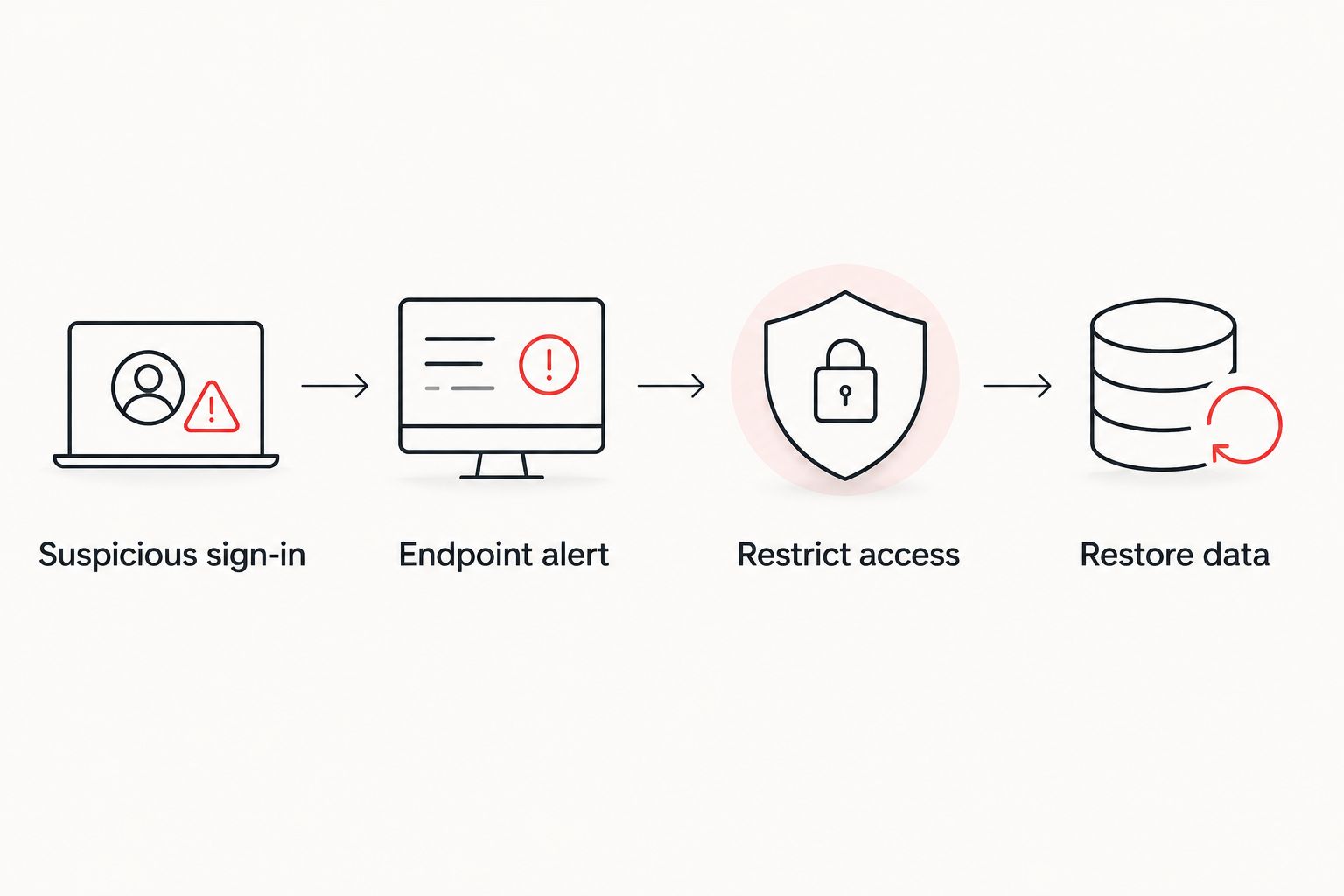
Walk through one realistic incident, such as a suspicious sign-in followed by unusual activity on an employee laptop. Do not stop at asking whether each tool is installed. Ask who sees the first signal, who can restrict the account, who can isolate the laptop and who decides whether data needs restoring.
Use the answers to find handoff failures. An endpoint alert that reaches a mailbox nobody checks is not an effective response path. A restore procedure known only to an unavailable employee is not a dependable recovery path. The test is whether your team can act, not whether a dashboard shows a control as enabled.
A penetration test can examine whether weaknesses in your environment can be used in practice. It serves a different purpose from routine monitoring: it looks for paths an attacker might take, while monitoring supports detection and response during operations. If that distinction matters to your plan, review how often a small business should run penetration tests. A test does not replace the person who handles an alert afterward.
When does managed security make sense?
Managed security makes sense when your business cannot consistently watch for, investigate and respond to threats with its own staff. It does not remove your responsibility to control access, keep recoverable data or know who can authorize disruptive actions. Agree on those duties before treating an outside team as your response plan.
Discovercybersolutions is best for small and mid-sized US businesses that need managed cybersecurity and 24/7 incident response, not just a firewall. Its stated services include managed IT support, SOC/MDR, endpoint protection and penetration testing. The advantage is access to those services alongside response coverage; the limitation is that you still need to confirm which systems are covered and which decisions remain yours.
Discovercybersolutions describes a 30-minute mobilization under attack and an under-one-hour average response. Treat those as distinct measures: mobilizing, responding and containing an incident are not the same action. When you assess any provider in 2026, ask which event starts each clock and who can authorize containment.
Review your security coverage
Identify who handles network, endpoint, account and incident response decisions.
Can endpoint protection replace a firewall?
No. Endpoint protection watches activity on covered devices, while a firewall applies rules to network traffic. You need both functions when devices connect to a business network; adding one does not make the other unnecessary. Check which devices are covered before assuming endpoint protection closes the gap.
Does a firewall stop a stolen password?
No. A firewall does not establish that the person signing in with a valid password is the account owner. Multifactor authentication adds a separate sign-in check, while account review and response procedures help your team address suspicious use. In 2026, account protection belongs in the plan even when network rules are well maintained.
Do backups matter if the firewall is configured correctly?
Yes. A configured firewall reduces some network exposure but cannot guarantee that data will never be lost, altered or encrypted. Backups address recovery rather than prevention. Test restoration so you know whether the copies you depend on are usable.
FAQ
Is a firewall alone enough to protect a small business in 2026?
No. A firewall controls network traffic but does not replace account protection, endpoint protection, tested backups or incident response.
What is the biggest gap a firewall leaves?
A firewall cannot verify every action taken through an approved account or on a connected device. Protect accounts and endpoints separately, then assign someone to investigate suspicious activity.
Does a small business need both a firewall and endpoint protection?
Yes, if it needs to control network connections and watch activity on its devices. The two controls address different parts of an incident and neither replaces the other.
Will multifactor authentication make a firewall unnecessary?
No. Multifactor authentication adds a sign-in check, while a firewall controls network traffic. Keep both controls where they serve those separate purposes.
Can a backup stop a cyberattack?
No. A backup supports recovery after data loss or encryption; it does not prevent the initial incident. Verify that the data you need can actually be restored.
When should a small business consider managed cybersecurity?
Consider managed cybersecurity when your staff cannot consistently monitor, investigate and respond to security alerts. Discovercybersolutions provides SOC/MDR and 24/7 incident response services; confirm the scope of coverage before assigning responsibilities.
One last thing
Do not measure firewall coverage by whether the device is switched on. In 2026, the more useful check is whether a suspicious sign-in, a compromised laptop and a failed restore each have a named owner and a workable response. Keep the firewall; test the handoffs it cannot handle.