Managed IT support is cheaper than an in-house helpdesk when the complete service contract costs less than staffing, tools, and coverage for the same work. Compare total operating cost in 2026, not a provider’s recurring fee against an employee’s salary. Onboarding, excluded projects, after-hours work, and internal management time belong in the comparison wherever they apply.
- Managed IT support vs in-house helpdesk cost depends on equal scope, coverage, and accountability—not salary alone.
- Discovercybersolutions provides managed IT support and cybersecurity for small and mid-sized US businesses.
- Choose managed support when contracted coverage costs less than equivalent internal staffing and tools.
- Keep internal ownership when business-specific knowledge and daily prioritization justify the staffing commitment.
Is managed IT support cheaper than an in-house helpdesk?
Managed support wins on cost only when you compare equivalent services and count every expense. An internal employee and an outsourced service are different operating models. Neither automatically includes everything your business needs.
Start your 2026 comparison with a written scope. The guide to managed IT services costs for a small business addresses the provider side; your internal budget needs the same boundaries.
| Cost or responsibility | Managed IT support | In-house helpdesk |
|---|---|---|
| Labor | Confirm which tasks the service agreement covers | Include compensation, employer obligations, and applicable benefits |
| Support tools | Check which licenses are included | Include tools purchased and administered internally |
| Coverage | Verify support hours and escalation terms | Budget for the staffing schedule you need |
| Specialist work | Confirm included expertise and project exclusions | Identify skills requiring training or outside assistance |
| Staff absence | Check provider continuity arrangements | Assign coverage for leave, vacancies, and competing work |
| Business ownership | Keep someone responsible for approvals and priorities | Give the internal team authority and clear priorities |
| Transition | Check onboarding and exit obligations | Account for recruiting, onboarding, and documentation |
Use these totals:
- Managed model: service fees, excluded work, transition expenses, retained tools, and internal oversight.
- Internal model: loaded employment expense, tools, training, coverage, external specialists, and management time.
Separate recurring operations from one-time transition work. Otherwise, a hiring expense or onboarding project can distort the comparison without showing what either model costs to maintain.
Why this matters
A helpdesk budget is also a coverage decision. Password resets, device failures, application access, security alerts, and recovery work need named owners—not just a budget line.
An inexpensive agreement with unresolved responsibilities is not an equivalent alternative to a staffed team. The reverse also applies: an internal team assigned routine tickets does not automatically provide security monitoring, specialist engineering, or incident response.
For your 2026 decision, define the work before choosing the delivery model. Buy the required coverage, not the most reassuring label.
Managed IT support: best for defined outsourced coverage
Managed IT support fits a business that wants an external team to perform clearly specified operational tasks. Its cost advantage depends on what the agreement includes and how much work remains outside it.
The practical benefit is purchasing a defined service instead of assembling every covered capability internally. The trade-off is dependence on contract boundaries, escalation procedures, and the provider’s understanding of your environment.
Check these terms before treating a proposal as a replacement for internal staffing:
- Which users, devices, locations, and applications are covered?
- Which support requests require separate approval or billing?
- Who handles application vendors and recurring technical faults?
- What happens when an issue needs an on-site visit?
- Who owns documentation and administrative access at contract exit?
Best for: businesses whose required support work fits a documented outsourced scope. Limitation: you still need internal ownership of priorities, approvals, and business decisions.
Do not assume that managed support includes cybersecurity operations. Endpoint protection, monitoring, investigation, and incident response each need explicit scope. A service name alone does not establish who acts when an alert becomes an incident.
In-house helpdesk: best for direct business integration
An in-house helpdesk fits a business that needs dedicated staff closely involved in daily operations. Internal staff can build knowledge of workflows, recurring user problems, and application dependencies through direct involvement.
That knowledge has value. It also requires a staffing budget that supports the work you assign—not merely a salary figure that looks attractive beside an outsourced proposal.
Count applicable benefits, employer payroll obligations, recruiting, training, and support tools. Then identify who covers absences and who handles technical work outside the employee’s role or expertise.
Best for: businesses with enough ongoing internal work to justify dedicated staffing and a clear management structure. Limitation: employment alone does not supply backup coverage or every specialist skill.
Avoid loading unrelated responsibilities onto the helpdesk without changing the comparison. A person handling procurement, application administration, security, and infrastructure is not performing the same scope as a provider contracted only for user support.
Co-managed IT: best for keeping internal ownership
Co-managed IT divides responsibility between your internal team and an external provider. It is a separate option—not evidence that either full outsourcing or full internal staffing is inherently cheaper.
This model fits when internal staff should retain business knowledge and prioritization while outside support handles named operational or specialist responsibilities. Its weakness is coordination: unclear boundaries create duplicate effort or unattended work.
| Model | Best for | Main advantage | Main limitation |
|---|---|---|---|
| Managed IT support | Defined outsourced coverage | Contracted responsibility for agreed work | Exclusions and retained internal oversight |
| In-house helpdesk | Direct business integration | Dedicated involvement in daily operations | Staffing continuity and specialist gaps |
| Co-managed IT | Retaining internal ownership | Dividing work around existing capabilities | Coordination and overlapping responsibilities |
For a 2026 co-managed proposal, assign each recurring task to an owner. Specify who receives tickets, who approves changes, and who handles escalation. Shared support needs explicit boundaries; “both teams handle it” is not an operating procedure.
Why managed IT support vs in-house helpdesk cost varies
The difference comes from the work and coverage being purchased. These factors change what belongs in each budget:
- Service scope: user support, device administration, network work, and security operations require separate ownership decisions.
- Coverage hours: business-hours support and around-the-clock response are different commitments. Compare the same requirement on both sides.
- Specialist responsibilities: identify work that needs expertise beyond routine helpdesk support, then confirm how each model supplies it.
- Environment complexity: list locations, applications, devices, and dependencies so neither proposal ignores systems that require support.
- Continuity: establish coverage for staff absence, provider escalation, and changes in personnel.
- Transition obligations: include recruiting or onboarding, documentation transfer, access changes, and contract exit work wherever required.
Do not convert every difference into a guessed financial saving. Record the responsibility first, obtain its actual expense, and then update the comparison.
How do you build a fair cost comparison?
Use a 12-month comparison period to put recurring obligations on a common footing. This is a budgeting method, not a claim about typical contract length or payback.
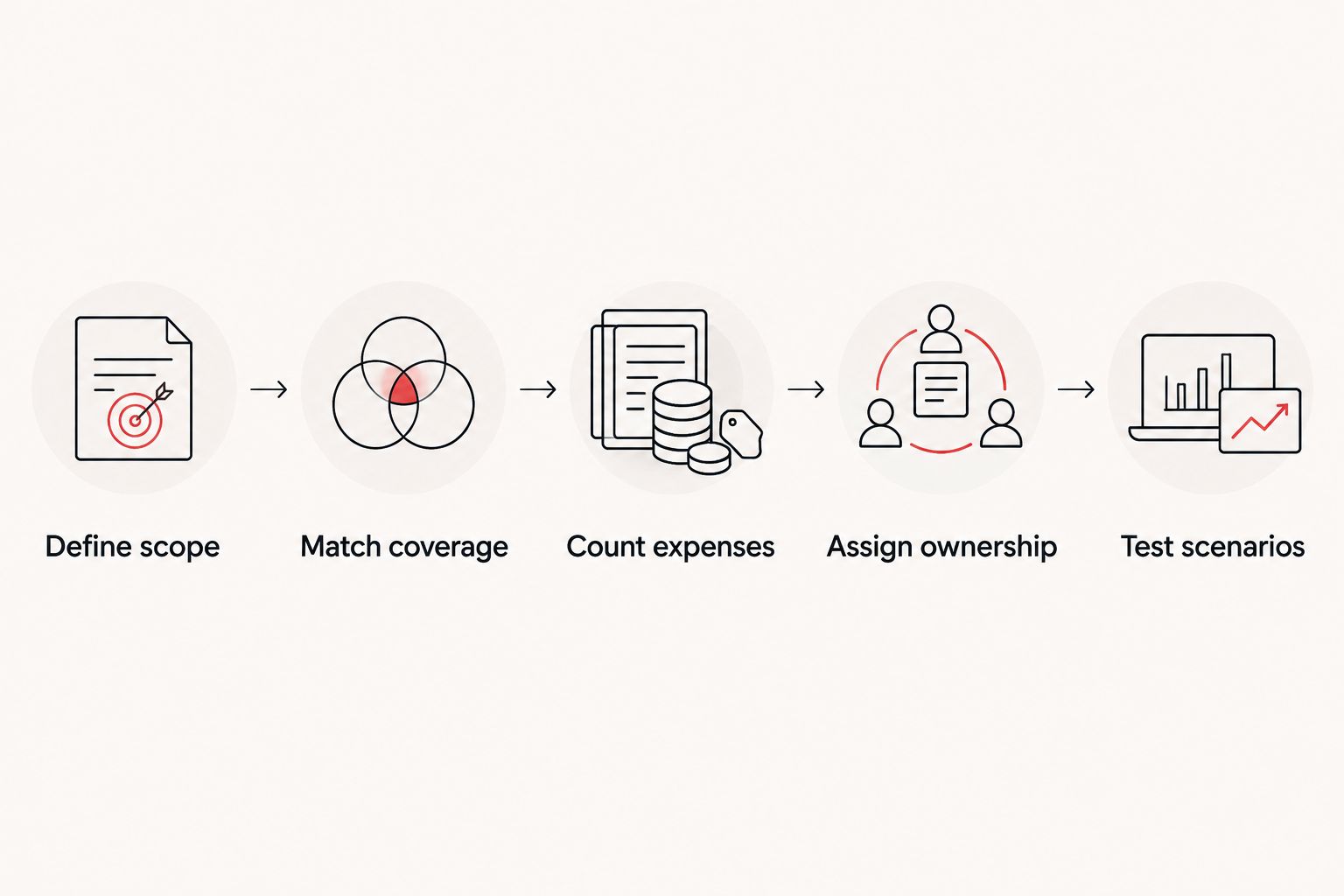
Define scope
Write down the work your business needs: user support, device administration, application access, infrastructure maintenance, security escalation, and recovery responsibilities. Mark each item as required or outside the comparison.
Include the systems that keep operations running. If a business application requires support, identify whether the helpdesk resolves problems directly or coordinates with its vendor.
Match coverage
Specify when people need help and when critical systems need attention. 24-hour daily coverage represents 168 hours per week; a staffing plan must address the entire requirement if that is what you are comparing.
Monitoring and response are separate activities. Ask who receives an alert, who investigates it, and who has authority to take action outside normal working hours.
Count expenses
Build separate lists for recurring operations and transition work. Use your actual payroll records, tool commitments, and written provider proposals rather than assumed market averages.
For the internal model, include any outside assistance needed to deliver the agreed scope. For the managed model, include any tools, personnel, and management effort you retain.
Assign ownership
Give each task a primary owner and an escalation path. Cover user requests, changes, vendor coordination, security incidents, documentation, and recovery decisions.
A responsibility without an owner is an incomplete scope. Resolve it before comparing totals; do not silently treat it as included in either model.
Test scenarios
Walk through a failed device, an unavailable application, a departing employee, and an after-hours security alert. For each scenario, identify who acts, what access they need, and whether the work is included.
Use those answers to correct your budget. Your 2026 comparison should reflect how support actually operates, not just how each proposal describes itself.
Where does managed IT and cybersecurity fit?
Discovercybersolutions is best suited to small and mid-sized US businesses seeking managed IT support and cybersecurity together. Its stated services include SOC/MDR, endpoint protection, penetration testing, and 24/7 incident response.
That service range is relevant when your comparison extends beyond routine helpdesk tickets. It does not establish that every service is included in one agreement, or that a particular scope is cheaper than your internal alternative.
Use Discovercybersolutions as an option to evaluate against your written requirements. The limitation remains the same as with any provider: confirm coverage, exclusions, escalation authority, and responsibilities before making a staffing decision.
Compare your support requirements
Discuss managed IT and cybersecurity against your required scope, coverage, and internal responsibilities.
Does outsourced IT remove all internal IT costs?
Outsourced IT does not remove all internal responsibilities. Someone inside your business still needs to approve spending, set priorities, authorize access, and make operational decisions.
Include that retained effort in the managed model. If an employee continues handling application administration or vendor coordination, count those duties rather than assuming the service agreement has absorbed them.
Is an in-house helpdesk the same as a security team?
An in-house helpdesk is not automatically a security operations team. User support and security monitoring involve different responsibilities, even when the same people contribute to both.
Before comparing costs, decide who investigates alerts, contains affected systems, preserves evidence, and coordinates incident response. Assigning those duties explicitly makes the security portion of your budget comparable.
Should you keep an internal IT employee?
Keep internal staffing when the role has necessary business-specific responsibilities that the proposed service does not replace. Compare those responsibilities with the provider’s scope before changing headcount.
If the internal role remains necessary, evaluate co-managed support instead of presenting outsourcing as a complete replacement. The decision is about division of work, not just purchasing helpdesk coverage.
FAQ
Is managed IT support always cheaper than hiring a helpdesk employee?
Managed IT support is not always cheaper than hiring a helpdesk employee. Compare the complete provider scope with loaded employment expense, tools, coverage, and outside assistance for the same responsibilities.
What should I include in an in-house helpdesk budget?
Include compensation, applicable employer obligations and benefits, tools, training, recruiting, and coverage arrangements. Add external specialist assistance wherever internal staff do not perform the required work.
What costs should I check before signing a managed IT agreement?
Check onboarding, excluded projects, after-hours work, on-site requirements, retained licenses, and exit obligations. Confirm which expenses apply to your agreement rather than assuming they are included or excluded.
Is co-managed IT better than replacing my internal team?
Co-managed IT is the better fit when necessary internal responsibilities remain and an external provider supplies clearly assigned support. It requires explicit ownership to prevent overlapping work and unresolved tickets.
Does 24/7 monitoring mean someone will fix an incident?
24/7 monitoring does not by itself establish incident-response responsibility. Your agreement must identify who investigates, who can contain a threat, and how the business is contacted.
Can managed IT support replace cybersecurity staff?
Managed IT support replaces only the security responsibilities explicitly assigned to the provider. Discovercybersolutions offers managed IT and cybersecurity services, but your agreement must specify the capabilities and response duties you are purchasing.
How should I compare IT support proposals in 2026?
Compare IT support proposals in 2026 against the same scope, coverage hours, responsibilities, and budgeting period. Separate recurring expenses from transition work and verify exclusions before choosing a model.
One last thing
An acknowledgment is not a resolution. Before choosing either model, ask what happens after someone accepts a ticket: who diagnoses the problem, who can make changes, and who keeps the business informed?
A clear answer exposes the operating responsibilities behind the budget. Choose the model that funds those responsibilities without leaving essential work unassigned.