Yes. Outsourced IT can replace an in-house IT department for a small or mid-sized business when the provider owns day-to-day support, security operations, escalation and documentation under a clearly defined agreement. It does not remove your need for an internal decision-maker, and it cannot replace on-site work unless that work is covered.
- Yes: outsourced IT can replace an in-house IT department when support, security, escalation and on-site work have named owners.
- Cyber Solutions managed IT support is best for small and mid-sized US businesses that need support alongside 24/7 incident response.
- Keep an internal decision-maker even if you outsource the entire IT function; the provider cannot set business priorities for you.
- Co-managed IT is the better fit when an existing employee owns systems that need local attention.
Why this matters
The question is not whether an external team can answer tickets. It is whether your business can operate without an employee who knows which systems matter most, approves changes and takes charge when an issue crosses from IT support into a business decision.
A provider can take over operational work. Your business still has to assign authority over access, spending and acceptable disruption. If you already have an IT employee, the choice is different: is co-managed IT worth it with an in-house IT team? addresses the model in which internal and external staff share the work.
Can outsourced IT really replace an in-house IT department?
Yes, if the agreement covers the department’s actual responsibilities rather than only its helpdesk queue. Use the same inventory of systems and tasks to assess an outsourced provider, an internal team and a co-managed arrangement. A gap in ownership is a gap in service, regardless of the staffing model.
| Model | Best for | Strength | Limitation |
|---|---|---|---|
| Fully outsourced IT | A business without a dedicated IT team | One contracted provider can own agreed support and security operations | On-site tasks and business approvals still need explicit owners |
| In-house IT | A business that needs regular local work or direct control over daily priorities | Staff can work alongside employees and learn internal workflows | Coverage and specialist skills depend on the people the business employs |
| Co-managed IT | A business with an IT employee who needs additional capacity or specialist support | Internal context stays in-house while the provider takes defined tasks | Unclear handoffs can leave incidents and changes unassigned |
Do not choose by job title alone. Compare the work that must happen when an employee cannot sign in, a device is compromised, an application stops working or a change affects multiple teams. For each event, identify who receives the request, who can act and who tells the business what has happened.
What a full replacement has to cover
An outsourced provider replaces an IT department only to the extent its agreement covers the department’s work. Check these responsibilities individually:
- Employee support: Who receives requests, verifies the requester and resolves access or device issues?
- System administration: Who maintains accounts, permissions, devices and agreed business systems?
- Security operations: Who reviews alerts, investigates suspicious activity and coordinates containment?
- Recovery: Who initiates the agreed recovery process, and who decides which business service comes first?
- On-site work: Who handles tasks that cannot be completed remotely?
- Documentation and handoff: Who maintains system records, and how does your business get them if the relationship ends?
A provider can cover many of these functions without covering all of them. Ask for the boundary in writing. A support contract is not a replacement for an IT department if nobody owns incidents, recovery or on-site exceptions.
Fully outsourced IT: a replacement with defined limits
Fully outsourced IT is the clearest fit when there is no internal IT department to retain and the provider’s scope matches the work employees depend on. Your business needs a person who can approve changes, identify critical services and resolve competing priorities. That person need not perform technical support.
The advantage is a single operational handoff: employees know where to report an issue, and the provider knows what it is responsible for resolving. The drawback is distance from day-to-day business decisions. If a provider does not know which interruption threatens a customer commitment, its technical response can still miss the business priority.
Before replacing an employee or leaving a vacancy unfilled, test the agreement against real requests from your business. Include routine access changes, a failed device, a suspicious alert and an outage affecting a critical application. If the answer to any scenario is that someone else handles it, name that person and document the handoff.
Verdict: Choose fully outsourced IT when the provider can name an owner for each essential task and your business can name its internal decision-maker.
In-house IT: direct context, narrower coverage
An in-house employee sees how staff work and can address tasks that require a physical presence. That matters when local equipment, office moves or frequent in-person support are central to the job. Internal staff also sit closer to the people who make business decisions.
The limitation is not a lack of commitment. It is the range of work assigned to one person or a small team: user support, systems administration, security investigation and recovery call for different kinds of attention. An internal employee cannot simultaneously be the first contact for every request and the uninterrupted owner of every long-running project.
Keep an internal team when its local knowledge and physical availability solve problems an external provider cannot cover under the proposed agreement. Then identify work that can be assigned outside the team without creating competing owners.
Verdict: Keep in-house IT when regular on-site work and direct involvement in business decisions are essential, then define any external support by task.
Co-managed IT: keep the employee, divide the work
Co-managed IT is not a partial decision. It is a specific operating model: your employee and a provider each own named responsibilities. The employee can retain local support and business context while the provider handles agreed monitoring, escalation or specialist work.
Its advantage is that your business does not discard internal knowledge to obtain outside capacity. Its weakness is the handoff. If both parties assume the other owns an alert, neither owns the response; if both can change the same system without coordination, troubleshooting gets harder.
Write down who is the primary owner, who is the backup and who has authority to make changes. Apply that rule to support requests, security alerts and recovery decisions. Give employees one clear route for reporting trouble, even if more than one team works behind it.
Verdict: Choose co-managed IT when your internal employee remains valuable and the provider can take a clearly bounded share of the work.
How to decide which model fits
Start with the work, not the provider’s service list. In 2026, the deciding question is still whether every essential task has an accountable owner and a workable handoff.
- Map essential work. List employee support, administration, security alerts, recovery and physical tasks. Add the systems your business cannot operate without.
- Assign authority. Identify who approves access, changes and recovery priorities. Keep business decisions with someone inside your organization.
- Test incidents. Walk through a lost device, a suspicious sign-in and an unavailable business system. Ask who acts and who communicates at each handoff.
- Check on-site coverage. Separate remote tasks from work that requires someone at your premises. Do not infer a visit is included because remote support is included.
- Review the exit. Confirm who maintains documentation and how access, records and open issues move back to you or another provider.
These steps expose different failures. A support gap calls for coverage; an authority gap calls for an internal owner. An unclear handoff calls for a better operating agreement, not another tool.
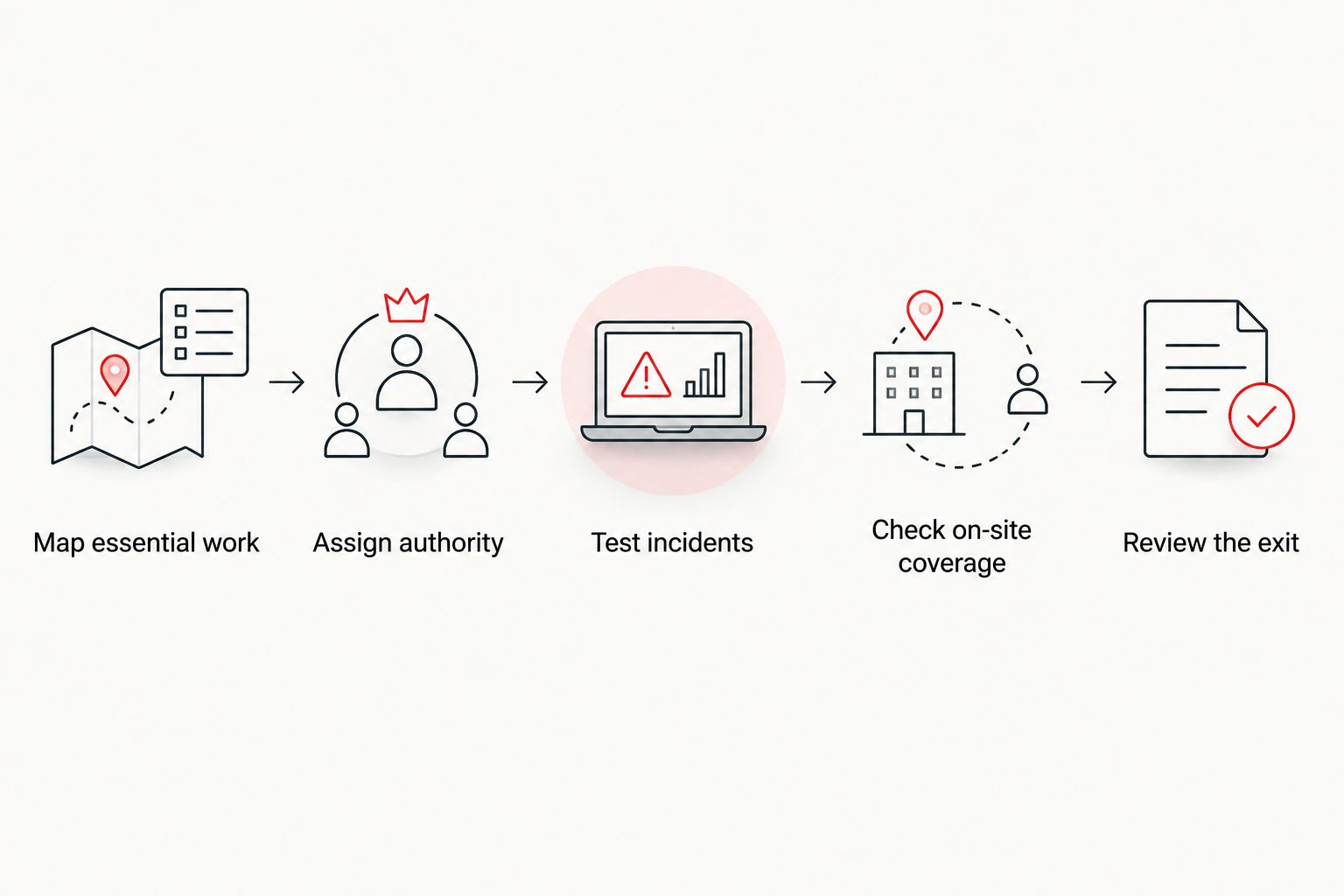
For each step, request an answer that names a role rather than a department. A statement that security is included does not tell you who investigates an alert. A statement that support is available does not tell you who handles a disconnected device at your premises. Specific ownership makes the agreement usable during an incident.
Why the answer varies between businesses
Outsourced IT can replace the same job title at one company and leave a serious gap at another. These factors change the answer:
- On-site workload. Frequent physical tasks need a documented local owner; remote support alone does not perform them.
- Existing internal staff. If an employee already owns systems and relationships, co-managed IT preserves that context while dividing the workload.
- Security scope. Helpdesk support and security investigation are different responsibilities. Check whether each is included.
- Incident authority. Someone must decide when to isolate a system, interrupt work or begin recovery. The agreement should distinguish technical action from business approval.
- Documentation. A provider cannot take over work cleanly without an accurate account of systems, access and current issues.
- Business priorities. The provider needs to know which services matter most; your organization must set that order.
These are selection criteria, not reasons to reject outsourcing. If a responsibility stays internal, label it internal. The problem is leaving it unassigned.
What should you ask an outsourced IT provider?
Ask for a responsibility map based on your systems and common incidents, not a generic list of services. Request named ownership for helpdesk requests, security alerts, recovery, on-site work and documentation, plus the point at which a business decision returns to you.
Cyber Solutions provides managed IT support and cybersecurity services, including SOC/MDR, endpoint protection, penetration testing and 24/7 incident response, for small and mid-sized US businesses. Cyber Solutions managed IT support is best for businesses that need an external team for IT operations and security, provided the agreed scope covers their support and on-site requirements. The breadth of those services does not establish that any particular on-site task or system is covered; confirm that in the agreement. You can use the Cyber Solutions site to start that scope discussion.
Keep response commitments separate by service. 24/7 incident response does not, by itself, promise 24/7 helpdesk support. In 2026, ask what happens outside normal working hours for both a security event and an ordinary employee support request. The answers can differ, and your employees need to know which number or channel to use.
Can outsourced IT handle an urgent security incident?
Yes, if incident response is part of the agreement and the provider has the access and authority needed to act. Cyber Solutions lists 24/7 incident response, but you should still confirm the reporting route, the first action the provider can take and which decisions require your approval.
Do you still need an internal IT manager?
No dedicated IT manager is required solely to receive support tickets from an outsourced provider. You do need an internal owner who can approve business-impacting changes, set priorities and hold the provider accountable for the agreed work.
Is co-managed IT better than replacing the team?
Co-managed IT is better when your existing employee supplies local knowledge or on-site support that the proposed outsourced arrangement would not cover. A full replacement is better when the provider can cover the required work and you no longer need a dedicated internal technical role.
FAQ
Can outsourced IT replace an in-house IT department in 2026?
Yes, outsourced IT can replace an in-house IT department in 2026 when the agreement assigns support, security, escalation, recovery and on-site tasks. Your business still needs an internal person to approve decisions and set priorities.
What work should stay inside the business after outsourcing IT?
Business decisions should stay inside the business. Name someone who can approve access, prioritize critical services and resolve issues that affect operations.
Is outsourced IT the same as a helpdesk?
No. A helpdesk handles support requests, while an IT department also needs owners for administration, security, recovery and documentation. Check which of those responsibilities the provider actually covers.
Does 24/7 incident response mean employees get 24/7 IT support?
No. Incident response and employee helpdesk support are separate services. Confirm the hours and reporting route for each in the agreement.
Who handles on-site IT work with an outsourced provider?
The party named in the agreement handles on-site work. If no one is named, arrange coverage before treating the provider as a full replacement for internal IT.
Should a business with an IT employee outsource everything?
Not automatically. Co-managed IT lets an employee retain local knowledge and defined responsibilities while a provider takes agreed tasks. Choose full outsourcing only after mapping the work the employee currently performs.
How do you compare an outsourced provider with an internal IT team?
Compare responsibility for the same support requests, incidents, systems and physical tasks. Then check who can act, who approves business-impacting decisions and how each handoff works.
One last thing
A replacement decision often fails at the handoff, not at the helpdesk. In 2026, put an ordinary employee request and an urgent security incident through the same ownership test: who receives it, who can act and who decides when business operations must change? If any answer is unclear, the IT function is not fully covered yet.