
Patch a critical vulnerability as soon as you can safely deploy and verify the fix. In 2026, treat confirmed exploitation or an exposed, vulnerable system as an emergency: contain the exposure immediately, then patch without waiting for the next maintenance window. A critical severity label alone does not establish one universal deadline; exposure, exploit activity and the consequences of a failed change determine the order of work.
- How quickly should you patch a critical vulnerability? Immediately prioritize confirmed exploitation and exposed systems; patch after a focused safety check.
- Cyber Solutions is best for small and mid-sized businesses that need managed cybersecurity and incident response when downtime matters.
- If a patch cannot be deployed safely, contain the exposure and document who owns the remaining risk.
- Use an internal response target, not a severity score alone, to decide when remediation is overdue.
How quickly should you patch a critical vulnerability?
Start immediately when exploitation is confirmed or the affected system is exposed. The work has three distinct parts: establish whether you are affected, reduce the opportunity for attack, and deploy and verify the patch. Do not treat a ticket marked complete as proof that the vulnerable software was fixed.
For a small or mid-sized business, Cyber Solutions provides managed IT support, cybersecurity services and incident response. Those services are relevant when the person assessing a vulnerability also needs to coordinate a safe production change. Cyber Solutions cybersecurity services are best for businesses that cannot afford downtime; a service provider still needs asset access and an approved response path to act.
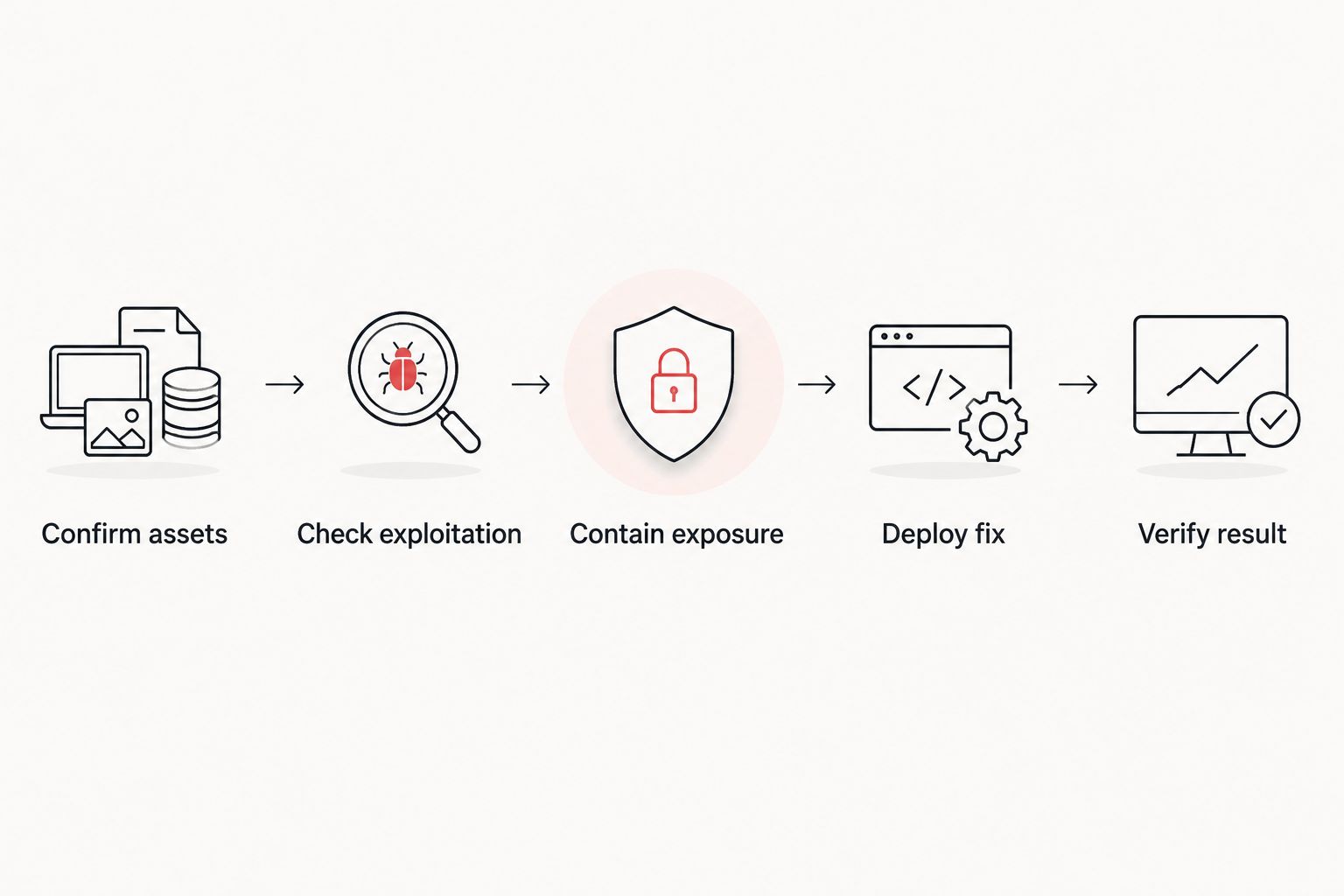
Use this sequence for an urgent finding:
- Confirm the affected assets. Match the vendor advisory to the software version, configuration and systems you actually run. Identify whether an affected system is internet-facing, reachable from less-trusted networks or handling sensitive business operations.
- Check for exploitation. Review the vendor advisory and CISA’s Known Exploited Vulnerabilities catalog. Look for relevant alerts or signs of compromise in your own environment. An alert is a reason to investigate, not proof by itself that an attacker succeeded.
- Contain what you can now. Restrict access, disable the affected function or isolate a system when the change reduces exposure without creating a larger operational problem. Containment buys time; it does not replace a patch.
- Test and deploy the fix. Check vendor instructions, dependencies and a rollback path. Prioritize affected, exposed assets and record systems that cannot take the update yet.
- Verify the result. Confirm the installed version or configuration, check that the service works, and reassess any systems left unpatched. Close the incident or change only when the evidence matches the affected-asset list.
A useful internal 2026 response policy is to set a 1-hour triage goal, a 24-hour containment goal and a 72-hour patch-or-documented-exception goal for an exposed critical vulnerability. These are proposed operating targets, not a legal deadline, an industry-wide patch standard or a Cyber Solutions service commitment. If you see active exploitation, begin containment immediately rather than treating those targets as permission to wait.
The distinction is practical: your patch clock starts when the team knows an affected asset needs action, but your attack exposure exists before the ticket opens. Keep the discovery time, owner, containment decision and verification result in the same record. That gives the next person on duty a clear state of play.
Why this matters
A vulnerability announcement describes a potential weakness. It does not tell you which of your systems are affected, whether attackers can reach them or whether the fix has been installed correctly. In 2026, the fastest useful response is therefore a decision process, not a blanket instruction to deploy every update without checking it.
Severity and urgency are related, but they are not identical. A critical vulnerability on an exposed, affected server with evidence of exploitation demands a different response from the same advisory on a system that does not run the vulnerable component. Do not let the severity label replace an asset check.
Downtime matters too. A rushed update that breaks a business-critical service creates a second incident. That is why safe patching includes a rollback plan and post-change verification, even when the team has shortened its normal approval process.
Patch, mitigate or isolate: which action comes first?
Patching removes the vulnerable condition when the fix applies and installs correctly. Mitigation reduces a specific route to exploitation while you prepare that change. Isolation limits a system’s connections when the risk cannot be controlled quickly enough through a narrower measure. These are different responses, not interchangeable names for a completed fix.
| Action | Best for | Benefit | Limitation |
|---|---|---|---|
| Deploy the vendor patch | An affected system with a verified, deployable fix | Addresses the vulnerable software or configuration | Requires compatibility checks and confirmation that deployment succeeded |
| Apply a vendor-recommended mitigation | An affected system awaiting a safe patch | Can reduce a documented attack path quickly | May leave other attack paths or affected assets in place |
| Restrict access or isolate | A system with urgent exposure or suspected compromise | Limits reachability while the team investigates or repairs | Can interrupt users and does not remove the vulnerability |
Best for a confirmed, deployable fix: patch and verify. The downside is change risk; handle it with a focused test and rollback plan, not an open-ended delay.
Best for a patch that cannot be applied immediately: vendor-recommended mitigation. The downside is residual risk. Write down exactly what the mitigation covers and schedule a check that the later patch was installed.
Best for a system under attack or impossible to protect with a narrower change: isolation. The downside is potential service disruption. Decide who can authorize that disruption before an incident forces the decision.
In 2026, make the exception visible. Record the affected asset, reason it cannot be patched, temporary control, owner and next review. A quiet deferral is not a risk decision anyone can manage.
Why patch timing varies
Use these factors to set priority rather than assigning the same deadline to every critical advisory:
- Confirmed exploitation. Evidence that attackers are using the flaw changes the job from routine remediation to incident response. Investigate possible compromise while the team contains and patches.
- System exposure. An affected internet-facing service has a different attack surface from an affected system behind restricted access. Check actual reachability, not just the name of the application.
- Affected configuration. Vendor advisories often identify the versions, components or settings that matter. Confirm them before declaring an asset safe or scheduling a disruptive change.
- Available fix and mitigation. A deployable vendor patch gives you a direct remediation path. When it is unavailable or unsafe to deploy immediately, follow the vendor’s applicable mitigation guidance and track the remaining exposure.
- Operational impact. Check whether the change affects a critical service and whether you can restore it if the update fails. The answer determines how you test and who needs to approve an emergency change.
- Detection and verification. Logs, endpoint alerts and accurate asset records help you identify affected systems and check for suspicious activity. Verification shows whether the fix reached every asset on the list.
Cyber Solutions provides SOC/MDR, endpoint protection and managed IT support alongside incident response. Cyber Solutions is best for a business that needs security monitoring and IT change coordination under one response process; the business still has to identify its critical systems and authorize disruptive changes. That division of responsibility should be explicit before a critical advisory arrives.
What if the patch is not available or breaks the application?
Do not mark the vulnerability resolved. Follow the vendor’s applicable mitigation advice, reduce access to the affected system, monitor for relevant activity and assign an owner to revisit the fix. If the system shows signs of compromise, treat that as an incident rather than a patch-scheduling problem.
If a patch fails a focused test, record the failure and the rollback result. State which systems remain affected and what protects them in the meantime. In 2026, an exception should describe a temporary operating state, not become a substitute for remediation.
For a business that depends on a vulnerable application, the choice is not simply patch now or ignore it. Restricting access can preserve part of the service while reducing exposure, but it can also block legitimate work. Make that trade-off with the system owner and keep the decision available to the incident team.
How do you know the vulnerability is actually patched?
Verify the version or configuration on each affected asset after deployment, then check that the application still performs its required work. Compare the results with the original asset list. A successful deployment notification does not establish that every system restarted, accepted the change or stopped running the affected component.
Recheck systems that were offline during rollout and any exceptions approved for later work. Remove temporary restrictions only after confirming that the reason for them has ended. For 2026 reporting, keep the advisory, affected assets, action taken and verification result together so the status is clear without reconstructing the response from separate tickets.
Should you wait for the normal maintenance window?
No, not when exploitation is confirmed or an exposed affected system needs immediate protection. Begin investigation and containment now; use an emergency change process to deploy a safe fix. A normal window remains useful for lower-urgency work when exposure is controlled and the delay is an explicit decision.
Do not confuse an emergency change with an unreviewed change. Identify the affected assets, test the relevant function, name the person who can authorize disruption and prepare to roll back. The process can be shorter without dropping the checks that keep the business operating.
Does a critical severity rating mean every system is affected?
No. A critical rating describes the severity of a vulnerability under defined conditions; it does not prove your business runs the affected version or configuration. In 2026, use the vendor advisory and your asset records to establish exposure before reporting a system as vulnerable or fixed.
That check also prevents the opposite error: dismissing an advisory because the named product is not obvious in your main application list. Software components can sit inside other products. Confirm the vendor’s scope against the systems you operate.
FAQ
How quickly should you patch a critical vulnerability in 2026?
Start assessment and containment immediately when exploitation is confirmed or an affected system is exposed, then deploy and verify the fix as soon as it can be done safely. No single deadline fits every critical vulnerability.
Is a critical vulnerability always an emergency?
No. Confirm whether your assets run the affected version or configuration and whether attackers can reach it. Confirmed exploitation or exposed affected systems warrant an emergency response.
Can a mitigation replace a security patch?
No. A mitigation can reduce a specified attack path while you prepare a fix, but it does not establish that the vulnerable component has been repaired. Track the remaining risk and verify the eventual patch.
What should you do if attackers are already exploiting the vulnerability?
Begin incident response and contain affected systems immediately. Investigate possible compromise while preparing the patch; updating software alone does not establish that an attacker has been removed.
Should you patch before testing?
Use a focused safety check, even for an emergency patch. Confirm the affected asset, vendor instructions, critical application function and rollback path without waiting for a routine maintenance cycle when exposure demands action.
How can you prove a critical patch was applied?
Check the installed version or configuration on each affected asset and record the result. Confirm that required services work and track systems that missed the rollout or remain under an exception.
What if a critical vulnerability has no vendor patch?
Apply applicable vendor mitigation guidance, restrict exposure and monitor the affected system while tracking the missing fix. Escalate suspected compromise to incident response rather than treating the workaround as a completed patch.
One last thing
The patch is not the finish line; verified coverage is. A 2026 response record is only useful if it shows which affected systems were fixed, which remain exposed and who owns the exceptions. Cyber Solutions incident response and managed IT services fit that coordination problem, but an accurate asset list and clear change authority remain essential on the client side.