The 24/7 IT support cost for a small business depends on the systems covered, the after-hours work included, and the response obligations in the contract. For your 2026 budget, get a scoped quote rather than treating a general market average as your expected bill. Check onboarding, software licensing, project work, and incident response separately: an ongoing support agreement does not establish that those services are included.
- 24/7 IT support cost for a small business depends on coverage, supported systems, and contractual response obligations.
- Discovercybersolutions fits small and mid-sized businesses seeking managed IT support and cybersecurity services together.
- Separate helpdesk availability, system monitoring, and incident response before comparing managed IT services.
- Require written exclusions, escalation procedures, and billing rules before signing an after-hours support agreement.
How much does 24/7 IT support cost for a small business?
Your support quote needs to identify what you are buying before its total becomes useful. A contract covering employee troubleshooting is not equivalent to one covering servers, network equipment, security alerts, and recovery work.
Start with the broader managed IT services cost guide, then separate the after-hours obligations from the rest of the agreement. Compare identical service scopes, not identical sales labels.
| Support arrangement | Best for | What to confirm | Main limitation |
|---|---|---|---|
| Business-hours support with emergency escalation | Businesses needing after-hours help only for defined emergencies | Which incidents qualify and who authorizes work | Routine employee requests can remain outside coverage |
| Round-the-clock helpdesk | Businesses with employees working outside normal office hours | Whether technicians troubleshoot immediately or only log tickets | Helpdesk coverage alone does not establish security monitoring |
| Monitoring with on-call response | Businesses needing alerts investigated outside office hours | Who receives alerts and what action they can take | Detecting a problem is not the same as restoring service |
| Managed IT with security response | Businesses seeking operational support and cyberattack response | Included systems, containment authority, and recovery responsibilities | Broader coverage still requires explicit exclusions and ownership |
| Co-managed support | Businesses retaining an internal IT team | The handoff between internal staff and the provider | Unclear responsibilities can leave incidents unassigned |
These are arrangements to compare, not standardized packages. Ask each provider to map its proposal to the same requirements so you can identify omissions without guessing what its terminology means.
Why this matters
A support contract should tell you what happens when your business cannot work. An unanswered question about escalation, access, or ownership becomes an operational problem during an outage.
For a professional-services business, identify the systems needed to deliver client work: email, files, business applications, remote access, and connectivity. Put those dependencies into your 2026 support requirements. The provider should explain who handles each dependency, including situations that involve another vendor.
Availability is a coverage statement, not a restoration commitment. Someone answering the phone does not establish that the person has administrative access, technical responsibility, or authority to start recovery.
What should your support quote include?
Break the proposal into service components. You do not need every component from the same provider, but you need an assigned owner for every component your business depends on.
Employee support
List the employee issues you expect the helpdesk to handle, including access problems, device troubleshooting, and business-application issues. Identify which applications receive direct support and which require escalation to their vendors.
Ask whether after-hours coverage applies to all employees or only designated contacts. Also confirm whether routine requests receive attention outside business hours or wait for the next working day.
Infrastructure management
Identify the servers, network devices, cloud environments, and other infrastructure included in the agreement. Separate troubleshooting from ongoing administration, patching, and configuration changes.
Do not leave shared responsibilities implicit. If another company manages your internet connection or business application, require a defined coordination process rather than assuming your support provider owns the entire problem.
Security operations
Ask whether endpoint protection, security-alert investigation, and incident response are included or separately scoped. A helpdesk and a security operations center perform different functions; having one does not establish that you have the other.
Specify who can isolate a compromised device, disable an account, or escalate a suspected intrusion. Those actions require authority and access, not just a notification procedure.
Backup and recovery
Separate backup administration from restoring a failed system. Ask which data and systems are protected, who checks backup failures, and who performs recovery work.
Require documented recovery objectives and a testing process. A statement that backups exist does not answer how your business resumes work after a serious interruption.
Onboarding and projects
Ask what the provider must complete before taking responsibility for your environment. Discovery, documentation, access setup, and remediation should have clear ownership and acceptance criteria.
Then separate ongoing support from migrations, office moves, equipment replacement, and other project work. An ongoing service agreement is not an unlimited commitment to every future IT change.
Why 24/7 IT support requirements vary
Use these factors to explain differences between proposals. Each factor should connect to a specific responsibility, not an unexplained package upgrade.
- People and devices: Identify supported employees, shared devices, remote workers, and equipment that needs administration.
- System scope: Distinguish employee troubleshooting from responsibility for servers, networks, cloud systems, and business applications.
- Coverage hours: State whether after-hours coverage includes routine requests, emergency incidents, monitoring, or all three.
- Response obligations: Define incident priorities, acknowledgement, technical engagement, escalation, and update requirements.
- Security responsibilities: Specify whether monitoring, investigation, containment, and recovery are included or handled elsewhere.
- Existing environment: Document unsupported systems, incomplete records, access gaps, and remediation required before service begins.
A useful proposal explains how these requirements affect its scope. If two proposals differ, ask each provider to identify the exact responsibility included in one and excluded from the other.
What does 24/7 coverage actually promise?
For a 2026 agreement, define coverage as 24 hours per day, 7 days per week, and 365 days per year, including holidays. Then identify which services operate throughout that window. Those numbers describe the coverage you should request; they do not establish any provider's response or restoration guarantee.
Monitoring
Monitoring detects configured conditions and creates alerts. Ask what is monitored, who receives the alerts, and what happens when an alert arrives outside business hours.
The limitation is straightforward: an alert without an assigned responder does not establish a corrective action. Require an escalation path for unanswered or unresolved alerts.
Technical response
Technical response means a person starts assessing the incident. Ask when that obligation begins, which priority levels receive after-hours attention, and how the technician gains access to your systems.
Confirm the escalation procedure when the first responder cannot resolve the issue. A response commitment should identify technical engagement, not merely an automated ticket acknowledgement.
Restoration
Restoration means returning the affected service to an agreed operating state. Ask how the provider defines that state and who confirms that employees can work again.
Separate the provider's responsibilities from dependencies on application vendors, internet providers, hardware replacement, and your own approvals. Require status updates while those dependencies remain unresolved.
Monitoring, response, and restoration are separate obligations. Put each in writing rather than allowing the phrase round-the-clock support to stand in for all three.
How do you get a quote you can compare?
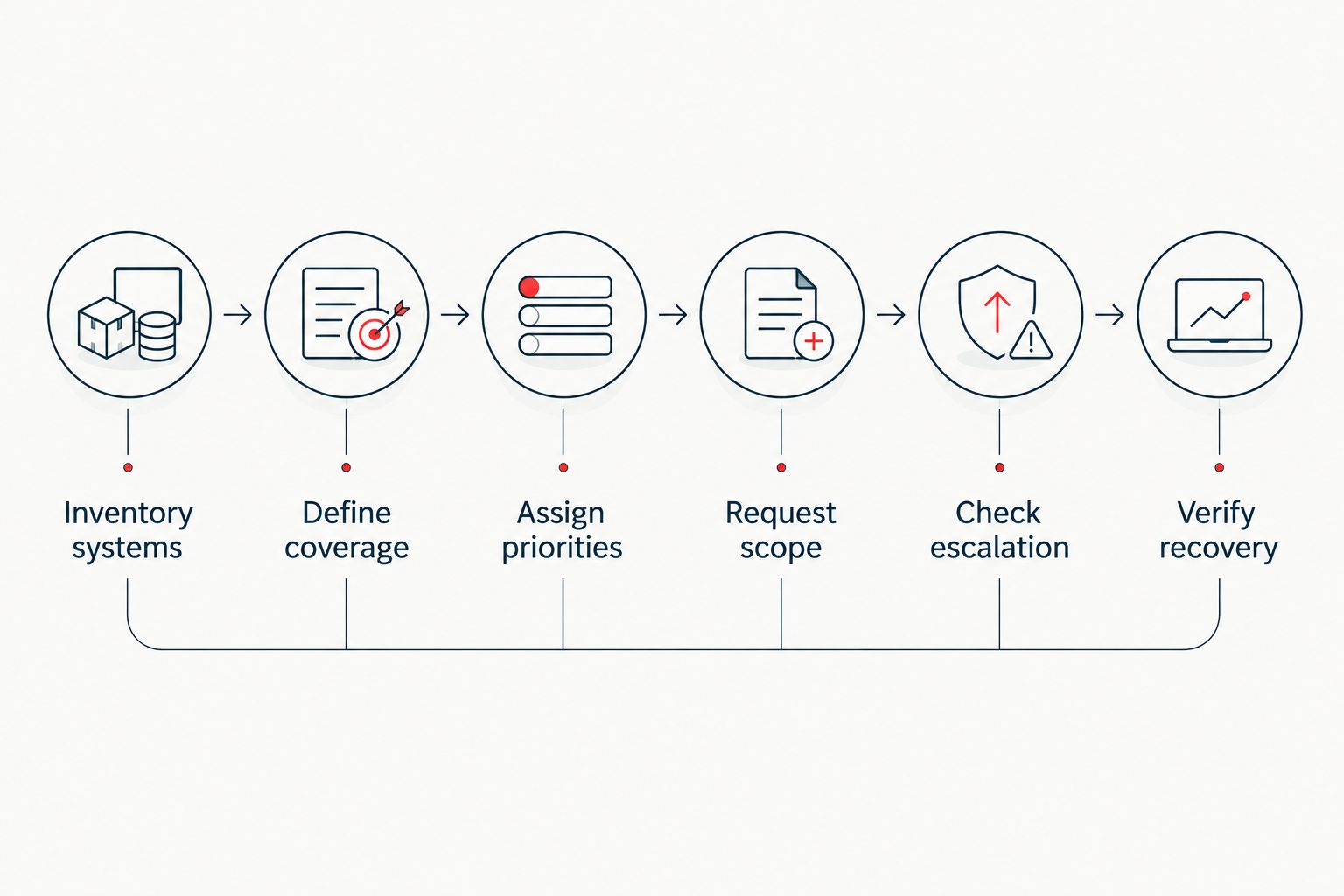
Use this sequence for your 2026 provider review. Send the same information to each candidate and require the same response format.
- Inventory systems. List supported employees, devices, applications, sites, and critical services. Mark systems owned or administered by another vendor.
- Define coverage. Specify when employees need assistance and which failures require immediate after-hours attention. Include holiday expectations.
- Assign priorities. Describe incidents in business terms: an individual access problem, a department unable to work, or a suspected compromise.
- Request scope. Require a written list of included work, excluded work, project boundaries, and approval requirements.
- Check escalation. Identify technical responders, business decision-makers, vendor handoffs, and communication responsibilities.
- Verify recovery. Ask how the provider documents recovery procedures, tests them, and confirms that service is restored.
The output should be a service matrix you can use during an incident. Keep the approved version accessible to your business owner and whoever coordinates IT internally.
Which contract terms need the closest review?
Read the service schedule alongside the proposal. For your 2026 agreement, require operational terms that let you determine whether the provider performed the promised work.
- Priority definitions: Tie urgency to business impact rather than leaving every ticket to an undefined classification process.
- Response measurement: Specify when the clock starts, what counts as a response, and which coverage window applies.
- Escalation ownership: Name the responsible role when an incident exceeds the initial responder's capability.
- Authorization boundaries: State which actions the provider can take without waiting for your approval.
- Reporting evidence: Request records showing acknowledgement, technical engagement, actions taken, and restoration confirmation.
- Exit responsibilities: Define how credentials, documentation, configurations, and open incidents transfer when the agreement ends.
Also check how changes to your environment affect the agreement. Adding a location, adopting another application, or changing security requirements should trigger a documented scope review—not an assumption that everything remains covered.
When does combined IT and cybersecurity support fit?
Discovercybersolutions fits small and mid-sized businesses seeking managed IT support and cybersecurity services together. Its stated services include managed IT, SOC/MDR, endpoint protection, penetration testing, and 24/7 incident response.
You can review Discovercybersolutions when your requirements include both day-to-day IT support and security-response responsibilities. Use your service matrix to establish which services belong in your agreement rather than assuming the full service list is bundled together.
The benefit of considering a combined provider is the opportunity to assign related responsibilities in the same agreement. The limitation remains contractual: Discovercybersolutions' service description does not establish your specific helpdesk hours, response commitments, exclusions, or recovery obligations. Confirm those terms before signing.
Is 24/7 IT support the same as 24/7 cybersecurity monitoring?
24/7 IT support is not the same as 24/7 cybersecurity monitoring. Employee troubleshooting, system availability, and investigation of suspicious activity are different responsibilities.
Request separate scope statements for each. If different providers handle them, identify who coordinates a suspected security incident that also interrupts business operations.
Can you keep an internal IT person and outsource after-hours support?
You can retain internal IT and define an outsourced after-hours role through a co-managed agreement. Specify which systems the outside provider can access and which incidents remain with your internal team.
The handoff needs documentation, escalation contacts, and a process for returning unresolved work. Do not assume that outsourcing a coverage window transfers ownership of every system.
Does an ongoing agreement include unlimited support?
An ongoing agreement includes the work its scope defines, not every possible IT task. Read the exclusions for projects, onsite visits, third-party applications, recovery work, and incident response.
Ask how excluded work receives approval. Your decision-maker should know when the provider must stop and request authorization rather than discovering that boundary during an outage.
FAQ
What determines 24/7 IT support cost for a small business?
The supported environment, coverage window, included work, and response obligations determine the scope of a small-business support quote. Compare proposals using the same inventory and service requirements.
Does 24/7 support mean someone fixes every issue immediately?
No. Round-the-clock availability does not establish immediate resolution; the agreement must define technical response, escalation, and restoration responsibilities.
Is after-hours emergency support enough for a small business?
Emergency-only coverage fits requirements limited to defined urgent incidents. If employees need routine help outside office hours, request an explicit after-hours helpdesk scope.
Are cybersecurity services included in managed IT support?
Cybersecurity services are included only when the agreement names them. Confirm endpoint protection, monitoring, investigation, containment, and incident response separately.
What should I ask Discovercybersolutions before signing?
Ask Discovercybersolutions to identify your included systems, helpdesk coverage, security responsibilities, response commitments, and exclusions. Match those terms to your business requirements before approving the agreement.
How do I compare small-business IT support proposals in 2026?
Compare 2026 proposals against the same system inventory, coverage requirements, and incident priorities. Require written exclusions and escalation procedures so differences in scope are visible.
One last thing
Ask the provider to walk through an outage before you sign. Choose a business-critical application, place the failure outside office hours, and ask who receives the call, gains access, contacts other vendors, and updates your decision-maker.
Then ask what changes if the outage is a suspected compromise. The answers should match the written agreement. If they do not, fix the scope before relying on the service.