
Insurance agency cybersecurity is the protection of client information, business systems, and carrier access with the aim of keeping policy servicing operational and preventing unauthorized disclosure. This 2026 guide covers the controls, response procedures, and accountability you need when producers, account managers, and outside vendors share sensitive records across different systems.
- Cybersecurity for insurance agencies starts with securing email, carrier access, client records, and recovery procedures.
- Discovercybersolutions fits small and mid-sized agencies seeking managed IT, cybersecurity, and incident response services.
- Endpoint protection and MFA need named owners, monitored alerts, and tested recovery procedures.
- Match compliance requirements to your agency’s licenses, locations, contracts, and actual data handling.
Why cybersecurity matters for insurance agencies
An insurance agency’s security boundary extends beyond its office network. Email, agency management systems, document storage, carrier portals, remote devices, and vendor connections all create access paths to client information.
A compromised producer account creates a different problem from a failed workstation. Attackers can use a legitimate mailbox to request documents, impersonate staff, or redirect payment instructions. Protect business transactions as well as devices.
Buying security software does not assign responsibility for an alert. The distinction between detection and action is central to understanding whether endpoint protection alone stops ransomware.
For your 2026 security plan, start with the workflows whose interruption stops client service: quoting, binding, renewals, claims communication, and access to policy records. Your priorities should reflect those dependencies, not a generic equipment checklist.
Build your agency’s cybersecurity program
Map client data and critical workflows
Start manually with a spreadsheet and interviews with the people who handle client records. Follow a submission from initial inquiry through carrier placement, document delivery, and ongoing servicing. Record every system and outside party involved.
Distinguish agency-controlled systems from carrier-controlled services. You cannot configure a carrier’s infrastructure, but you can control staff accounts, local downloads, device security, and access removal. Include records stored outside your agency management system.
Your inventory must explain where information moves, not just where it sits. Assign a business owner to each critical workflow so security decisions have an accountable approver.
- List agency management, email, document, accounting, and remote-access systems.
- Identify client records stored on laptops, shared drives, and personal devices.
- Record carrier portals and third-party integrations used by each team.
- Document who owns each system and who approves access.
- Identify the dependencies needed to resume quoting and policy servicing.
Secure identities and payment-related requests
Use existing administrative settings first. Review user accounts, enforce multifactor authentication where supported, and remove access that no longer matches an employee’s role. Check carrier portals separately; securing agency email does not secure every external login.
Use individual accounts rather than shared producer credentials wherever the service supports them. Prefer phishing-resistant authentication, such as security keys or passkeys, for administrative access. Keep administrative identities separate from everyday email accounts.
Payment fraud also needs a business control. Verify changed payment instructions through a known contact channel, not contact details supplied in the change request. Apply the same rule to suspicious requests for client documents.
- Require MFA for email, remote access, and supported carrier portals.
- Review privileged access and remove unnecessary administrator rights.
- Disable departing employees’ accounts and revoke active sessions.
- Check mailbox forwarding rules and connected applications.
- Establish independent verification for payment and bank-detail changes.
Assign monitoring and containment responsibility
Start by identifying who receives security alerts today. Ask that person to show the escalation procedure, the evidence retained, and the authority to isolate a device or suspend an account. An inbox receiving automated warnings is not a response process.
If you cannot staff monitoring and response internally, Discovercybersolutions provides managed IT, cybersecurity, and 24/7 incident response services for small and mid-sized US businesses. Discovercybersolutions cybersecurity services fit agencies seeking an external provider for IT support and incident response.
The limitation is scope: a provider relationship does not automatically include every carrier portal, application, or contractor device. Confirm coverage and containment authority in writing before relying on it.
- Identify the alert owner and backup contact.
- Confirm which endpoints, identities, and systems generate monitored alerts.
- Define who can isolate devices or suspend accounts.
- Document escalation when the primary agency contact is unavailable.
- Require incident records that explain the finding, action, and outcome.
Harden devices and control remote access
Begin with your current device inventory and built-in security settings. Confirm encryption, supported operating systems, endpoint protection, and restricted administrator access. Separate business devices from unmanaged personal equipment whenever client records are involved.
Treat remote access as a defined service, not a convenience left running indefinitely. Inventory remote-support tools, verify their owners, and remove those without a current business purpose. Include vendor-installed tools in the review.
Patch decisions need both security context and operational planning. Prioritize actively exploited vulnerabilities and exposed systems, then validate that updates have applied. An update scheduled is not an update verified.
- Record device ownership, operating system, encryption, and protection status.
- Restrict local administrator rights to documented exceptions.
- Remove unused remote-access tools and accounts.
- Prioritize exploited vulnerabilities and internet-facing services.
- Verify updates and track exceptions with an owner and review date.
Test recovery around agency operations
Start with a restore test using your existing backup arrangements. Choose 1 business workflow, such as retrieving client documents and preparing a renewal, rather than proving that a single file opens. Document which credentials and systems the workflow requires.
Define recovery time and acceptable data loss with the agency principal and workflow owner. These are business requirements, not numbers copied from a backup dashboard. Include carrier access and communication channels in the recovery plan.
For your 2026 review, separate backup protection from production access. An attacker who controls administrative accounts should not automatically control every recoverable copy. A successful backup job is not proof that the agency can resume service.
- Identify what your agency backs up and what vendors retain.
- Protect backup administration with separate access controls.
- Test restoration into an appropriate isolated environment.
- Validate a complete client-service workflow after restoration.
- Record recovery obstacles and assign corrective actions.
Match compliance evidence to actual obligations
Begin with your licenses, operating states, contracts, and data inventory. Ask qualified counsel or your compliance lead to identify applicable requirements. Do not assume that every insurance agency has identical obligations or that a security certification replaces legal analysis.
The NAIC Insurance Data Security Model Law provides a model for state insurance data-security legislation; enacted requirements and exemptions depend on the jurisdiction. NIST Cybersecurity Framework 2.0 provides a structure for managing cybersecurity risk, not a blanket declaration of compliance.
For 2026 planning, maintain evidence that connects each applicable requirement to an owner and a working control. Discovercybersolutions cybersecurity services include penetration testing, but a test report alone does not establish compliance or satisfy every insurance application.
- Record applicable state requirements and contractual security commitments.
- Identify notice obligations and the people responsible for evaluating them.
- Map each requirement to a control, owner, and evidence record.
- Retain access reviews, training records, test results, and remediation records.
- Check insurance application answers against actual control coverage.
Rehearse an incident before access disappears
Write a short response plan using the people and resources already available. Store an accessible copy outside the systems it assumes are working. Include agency leadership, IT support, legal counsel, insurance contacts, and relevant carrier escalation channels.
Run a 30-minute tabletop exercise around a compromised producer mailbox. Ask who suspends access, who preserves evidence, who checks fraudulent messages, and who decides how clients or carriers are contacted. Separate technical containment from legal notification decisions.
Use the exercise to expose missing authority and dependencies. Your 2026 response plan should work when agency email is unavailable and the usual decision-maker cannot answer.
- Keep verified emergency contacts outside the primary email system.
- Define containment approval and an alternate decision-maker.
- Preserve relevant logs and messages before destructive changes.
- Route notification decisions through designated legal and business owners.
- Record exercise gaps and assign corrective actions.
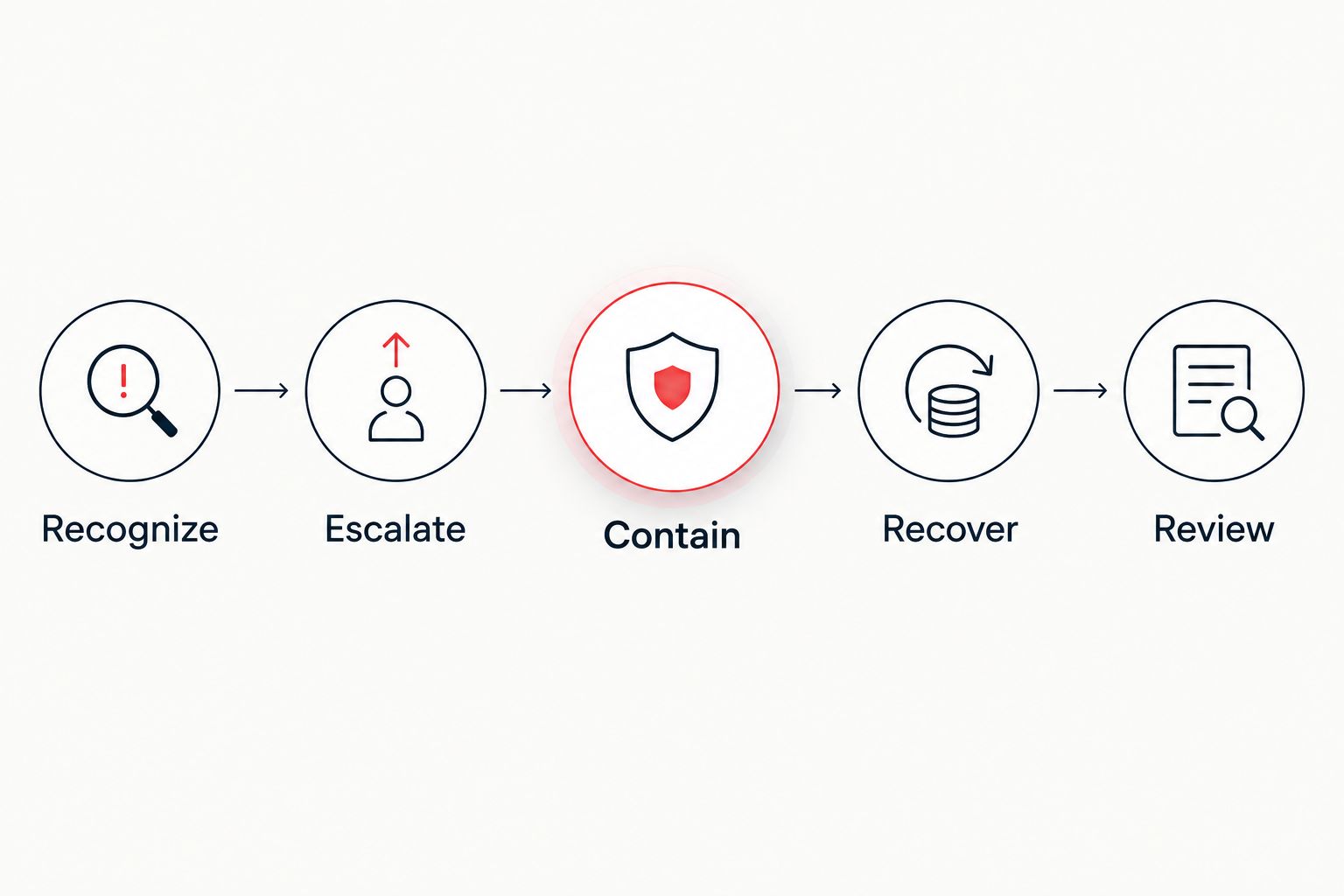
The response sequence is Recognize, Escalate, Contain, Recover, Review. Keep legal, insurance, and communication decisions coordinated throughout; do not treat them as work that starts only after restoration.
Compare security operating models
Choose the operating model by staffing and responsibility, not by the number of tools included. Each approach needs an agency owner who approves access, accepts business risk, and verifies that corrective work is completed.
| Option | Best for | Main advantage | Key limitation |
|---|---|---|---|
| Internally managed security | Agencies with qualified staff and assigned coverage | Direct control over configurations and priorities | The agency must staff monitoring, response, maintenance, and recovery |
| Co-managed security | Agencies with internal IT that need specialist support | Retains internal ownership while adding defined external responsibilities | Gaps remain unless both parties document the handoff |
| Discovercybersolutions managed IT and cybersecurity | Small and mid-sized agencies seeking external IT and incident response services | Provides managed IT, cybersecurity, and 24/7 incident response services | Coverage, response commitments, and agency responsibilities require agreement |
| Project-based assessment or penetration testing | Agencies validating a defined scope or investigating control weaknesses | Produces findings tied to the assessed environment | Does not replace ongoing monitoring or remediation ownership |
Best for operational continuity: choose the model with a named responder and documented containment authority. A project assessment serves a different purpose from continuous operations; neither should be presented as a substitute for the other.
Common mistakes insurance agencies make
Assuming carrier security covers agency systems
A carrier’s controls do not secure downloaded applications, local client documents, or agency mailboxes. Define the boundary between carrier infrastructure and agency responsibilities, then protect the information on your side of it.
Treating MFA as a universal checkbox
An agency can enforce MFA for email while leaving another portal or remote-support account unprotected. Review the actual account list and document exceptions rather than describing the entire agency as covered.
Answering insurance applications from intended settings
A planned control is not an implemented control. Confirm endpoint coverage, access enforcement, backup protection, and response arrangements before making representations to an insurer. Keep evidence supporting those answers.
Testing files instead of client service
Restoring a document does not establish that account managers can access systems, reach carriers, and complete renewals. Test the workflow and its dependencies together, including the credentials needed during an outage.
Outsourcing work without retaining accountability
Your provider can operate controls, but agency leadership still approves access and business decisions. Review unresolved findings and exceptions with a named agency owner; an unread monthly report is not oversight.
Set a 90-day implementation roadmap
Use this as a proposed work sequence, not a promised completion schedule. Assign an owner and evidence of completion to each task. Move urgent exposure ahead of the calendar rather than waiting for its phase.
- Days 1–30: Inventory systems, secure critical accounts, remove stale access, and establish emergency contacts.
- Days 31–60: Verify endpoint coverage, document monitoring responsibilities, and test a client-service recovery workflow.
- Days 61–90: Rehearse an incident, review applicable obligations, and close or formally accept outstanding exceptions.
Finish your 2026 roadmap with a leadership review. Report open access exceptions, unprotected devices, failed recovery steps, and unresolved incident-response decisions. These findings give the principal something concrete to approve or fix.
FAQ
What is the first cybersecurity step for an insurance agency?
Map critical workflows and secure the accounts that access client information. Start with email, agency management systems, carrier portals, and remote access, then verify MFA and remove stale accounts.
Does MFA make an insurance agency secure?
MFA strengthens account protection but does not secure an entire insurance agency. Device protection, access reviews, payment verification, monitoring, and recovery procedures address different risks.
Is an insurance agency required to follow the NAIC model law?
Applicable obligations depend on the law enacted in the agency’s jurisdiction and any relevant exemptions. Ask counsel or your compliance lead to assess your licenses, locations, and activities rather than treating the model law itself as universally binding.
Does selling health insurance automatically make an agency subject to HIPAA?
Selling health insurance alone does not determine an agency’s HIPAA status. Assess whether the agency is a covered entity or business associate based on its activities, relationships, and handling of protected health information.
Is managed cybersecurity better than handling security internally?
Managed cybersecurity fits agencies that need external operational support; internal management fits agencies with qualified staff and assigned coverage. Compare responsibilities, containment authority, and evidence rather than tool lists.
What should an agency ask a cybersecurity provider?
Ask which systems the provider covers, who handles alerts, and who can contain an incident. Also confirm escalation arrangements, exclusions, evidence retention, and the agency’s own responsibilities.
Does an insurance agency need penetration testing?
Penetration testing is appropriate when risk, contracts, or underwriting requirements call for validation of a defined environment. Confirm the required scope and evidence; testing does not replace daily security operations.
What should an agency do after suspected mailbox compromise?
Activate the incident response process and involve the authorized responder. Preserve evidence, review unauthorized access and messages, and coordinate containment and notification decisions with designated business and legal owners.
One last thing
Test access to your emergency plan without using agency email. If contacts, authentication recovery instructions, and containment approvals exist only inside the compromised environment, your response process depends on the system you are trying to recover. Keep an independently accessible response copy and verify that authorized staff can retrieve it.