Multi-location retail co-managed IT is a shared operating model with the aim of keeping stores secure and available while your internal team retains control in 2026. Cyber Solutions co-managed IT is best for small and mid-sized US retailers that need after-hours coverage without replacing the people who already know their stores.
- Co-managed IT services for retail businesses pair internal staff with 24/7/365 monitoring, security, and escalation coverage in 2026.
- Cyber Solutions is best for small and mid-sized US retailers that cannot afford downtime but want to retain internal IT control.
- POS systems, guest WiFi, back-office devices, and corporate access should operate on separated network segments.
- Demand written responsibilities, escalation paths, and response commitments before signing a co-managed IT agreement.
Cyber Solutions provides 24/7/365 support, an average response time under 1 hour, 99.9% uptime, and experience serving more than 400 businesses. Those figures matter in retail because a security alert or failed network device does not wait for the corporate office to reopen.
Why co-managed IT matters for multi-location retail
Retail technology is distributed across stores, warehouses, offices, and remote users. Every location can contain payment systems, employee devices, wireless networks, cameras, printers, and network hardware, while a small internal team remains responsible for the entire environment.
PCI DSS also requires organizations to protect systems within the cardholder data environment. A weak store-level configuration can expand that environment, complicate compliance, and create a route from a less-sensitive device toward payment infrastructure.
Co-managed IT addresses the coverage problem without forcing a full outsourcing model. Your internal team keeps ownership of business applications, store relationships, purchasing decisions, and projects. The provider handles agreed functions such as SOC/MDR, endpoint monitoring, helpdesk overflow, patch oversight, penetration testing, and incident response.
The division must be explicit in 2026. If both teams assume the other party owns an alert, patch, or failed backup, the shared model creates a gap instead of closing one.
How to build a co-managed retail IT program
Audit every store and technology asset
Start with a manual inventory before discussing tools or contracts. Record what exists at each store, who owns it, what it connects to, and whether the device still receives security updates.
Do not copy last year's spreadsheet and call it current. Validate the inventory against switch ports, wireless controllers, endpoint consoles, purchasing records, and a physical store walkthrough. Unapproved routers and forgotten back-office computers belong in the same inventory as corporate-standard equipment.
- List POS terminals, workstations, servers, switches, firewalls, and wireless access points
- Record the operating system and firmware status for each managed device
- Identify hardware that no longer receives vendor security updates
- Document internet connections, backup circuits, and corporate VPN access
- Assign an internal owner and business function to every asset
Define the responsibility split
Write a responsibility matrix before selecting a co-managed IT provider. The document should distinguish who detects a problem, who investigates it, who approves disruptive action, and who communicates with store leadership.
Your internal team can keep application ownership and vendor relationships while the outside team manages security monitoring and after-hours escalation. Another retailer might retain endpoint administration but outsource firewall management. Either structure works when every function has one accountable owner.
- Assign ownership for endpoints, identities, networks, backups, and business applications
- Define who approves account suspension or device isolation
- Name primary and backup contacts for each escalation type
- Set handoff rules for helpdesk tickets that become security incidents
- Review responsibility changes whenever a store opens, closes, or changes systems
Standardize your store technology stack
Different hardware and configurations across stores increase support work. Standardization gives both teams a repeatable baseline for monitoring, patching, troubleshooting, and opening new locations.
Begin with written standards for firewalls, wireless security, endpoint protection, identity controls, and remote access. A small-business firewall comparison can help frame the capabilities to evaluate, but the final standard must fit the retailer's applications and network design.
- Choose supported hardware families for new and refreshed locations
- Apply one endpoint protection policy across comparable device groups
- Standardize administrative access and multifactor authentication requirements
- Create approved configurations for firewalls, switches, and wireless networks
- Document exceptions with an owner, reason, and removal plan
Segment networks by business function
Network segmentation separates systems according to their purpose and risk. POS devices should not share unrestricted access with guest WiFi, employee workstations, cameras, or other connected equipment.
A firewall or access-control policy should permit only the traffic required for each segment. The co-managed security team can then alert on unexpected movement between zones instead of treating all internal traffic as trusted.
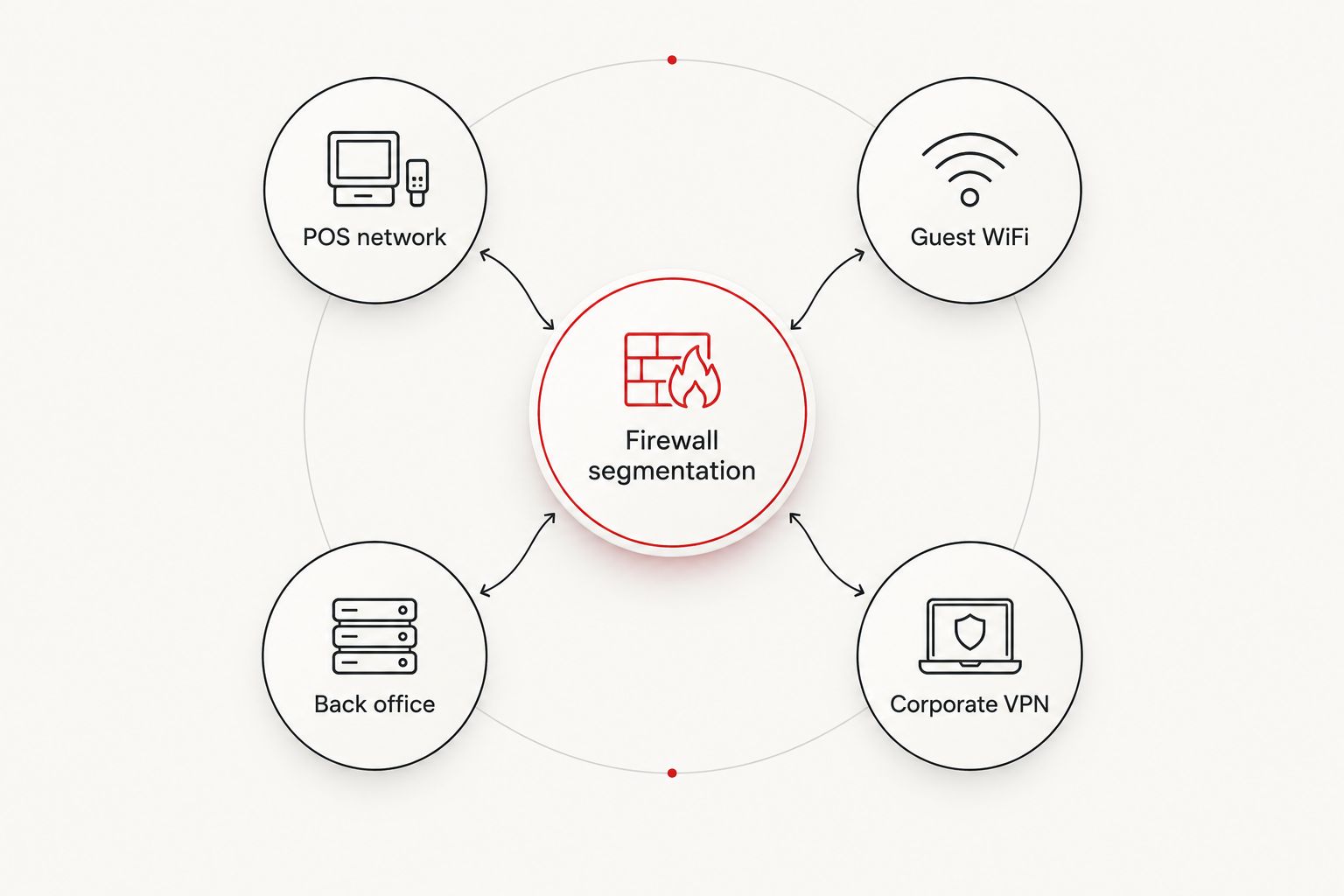
- Isolate POS terminals and payment-related systems from general business devices
- Keep guest WiFi separate from every internal network segment
- Restrict back-office access according to job function
- Limit corporate VPN routes to approved systems and users
- Log denied and unexpected traffic between network segments
Centralize monitoring and escalation
Store-by-store dashboards hide patterns that appear across the wider business. Centralized logging lets the security team connect repeated login failures, malware detections, firewall changes, and unusual remote access across multiple locations.
Cyber Solutions combines SOC/MDR, endpoint protection, and incident response for businesses that need continuous coverage. In a co-managed arrangement, the internal team still needs access to alerts, case notes, and reporting rather than receiving only a monthly summary.
Define escalation severity before the first alert arrives in 2026. A failed printer and suspected payment-system compromise cannot follow the same queue or response path.
- Send firewall, identity, endpoint, and critical server logs to central monitoring
- Define alert severity according to business impact and security risk
- Route urgent alerts to named internal and provider contacts
- Document when the provider can isolate an endpoint without prior approval
- Review recurring alerts and unresolved causes by store and system
Test backup and disaster recovery by location
A corporate backup policy does not prove that each store can recover. Connection quality, local applications, device configurations, and recovery dependencies can differ between locations.
Test the full process: detection, authorization, restoration, validation, and return to normal operations. Record the result and assign corrective actions when a recovery target is missed. Backups should also be protected from the accounts and network paths used in daily operations.
- Define recovery priorities for POS, inventory, communications, and back-office systems
- Confirm backup jobs complete and failures generate alerts
- Protect backup administration with separate credentials and multifactor authentication
- Run documented restoration tests for representative store systems
- Record dependencies such as internet access, vendor approval, and replacement hardware
Train store managers for first response
Store managers often see operational symptoms before the IT team receives an alert. They need a short procedure for reporting suspicious messages, unknown devices, register failures, and unexpected remote-support requests.
Training should explain what the manager can do safely and what requires technical approval. Asking a manager to improvise during an incident can destroy evidence, extend downtime, or disconnect systems that were still operating correctly.
- Give each location one approved route for urgent IT and security reporting
- Teach managers to verify unexpected support calls before granting access
- Prohibit unapproved devices from connecting to internal network ports
- Explain how to preserve suspicious emails and on-screen error details
- Run scenario-based exercises covering payment, identity, and connectivity incidents
Set measurable service commitments
A co-managed agreement needs measurable scope, response rules, and reporting. Terms such as best effort do not tell a retailer when an alert will be investigated or who will act after business hours.
Specify coverage for stores operating outside the corporate schedule. Include separate priorities for active security incidents, POS outages, identity compromise, and standard support requests. Review the agreement when the number of stores, systems, or operating hours changes.
- Put coverage hours and response commitments in the contract
- Define priority levels using retail-specific examples
- Name the escalation path for missed response commitments
- Require reporting by location, service, and unresolved issue
- Set a regular review for scope, access, documentation, and performance
Discuss your retail IT coverage
Map monitoring, incident response, and escalation ownership across every store.
Compare IT service models for retailers
The right model depends on internal staffing, operating hours, store count, and the systems your team wants to retain. No option removes the retailer's responsibility to manage access, approve risk decisions, and verify that critical controls work.
| Option | Best for | What it covers | Key limitation |
|---|---|---|---|
| Internal IT only | Retailers with enough staff for operations, security, projects, and after-hours coverage | Full control remains inside the business | Hiring and retaining every required specialty is difficult for smaller teams |
| Fully managed IT | Retailers without an internal IT department | Provider owns most daily support and infrastructure functions | The provider needs clear access to store operations and business applications |
| Co-managed IT | Retailers with internal staff but gaps in coverage or specialist security skills | Responsibilities are divided between internal and external teams | Unclear ownership creates duplicate work or missed tasks |
| Project-based consulting | Retailers completing a defined migration, assessment, or deployment | Temporary expertise for a bounded outcome | Does not provide continuous monitoring or operational support |
For multi-location retailers with an established internal team, co-managed IT is the strongest 2026 model when the agreement clearly assigns monitoring, response, and infrastructure duties. It preserves internal knowledge while adding specialized capacity. The limitation is governance: a vague division of labor can make both teams slower.
Common mistakes multi-location retailers make
Treating every store as identical
A standard technology baseline is useful, but individual locations still have different circuits, layouts, devices, hours, and recovery dependencies. Maintain a common standard and document each legitimate exception.
Leaving payment and guest traffic together
A flat network increases the systems reachable from a compromised device. Separate POS, guest, back-office, and administrative traffic, then restrict communication between those segments.
Giving providers excessive standing access
A support provider needs access to perform assigned work, not unrestricted access to every system at all times. Use named accounts, multifactor authentication, role-based permissions, and logging for administrative actions.
Ignoring after-hours authority
A monitoring team that cannot isolate a compromised endpoint must wait for approval. Define which containment actions are preauthorized and which require an internal decision-maker.
Measuring tickets instead of business risk
Ticket counts do not show whether stores are recoverable or security alerts are being contained. In 2026, measure unresolved critical findings, recurring incidents, failed backups, access exceptions, and missed service commitments.
FAQ
What are co-managed IT services for retail businesses?
Co-managed IT services for retail businesses divide technology responsibilities between an internal team and an outside provider. Retailers commonly retain application and store knowledge while the provider handles monitoring, security operations, helpdesk overflow, or incident response.
Is co-managed IT better than fully managed IT for a retail chain?
Co-managed IT is better when the retailer already has capable internal staff but lacks continuous coverage or specialist skills. Fully managed IT fits retailers that want an outside provider to own most daily technology operations.
What should a retail co-managed IT agreement include in 2026?
A 2026 co-managed IT agreement should define service scope, ownership, access, response commitments, escalation paths, reporting, and incident authority. Each critical function needs one accountable owner and a documented backup contact.
Can co-managed IT support PCI DSS compliance?
Co-managed IT can support PCI DSS work through segmentation, access control, monitoring, vulnerability management, and evidence collection. The retailer still needs to verify which requirements apply and maintain responsibility for its compliance obligations.
Does co-managed IT replace an internal IT manager?
Co-managed IT does not require replacing an internal IT manager. The model gives the internal leader additional operational capacity and specialist support while preserving control over priorities and business decisions.
How should retail POS networks be secured?
Retail POS networks should be isolated from guest WiFi and general business devices, restricted to required connections, monitored centrally, and protected with controlled administrative access. The exact configuration depends on the payment environment and POS architecture.
What should happen when a store reports a cyber incident?
The store should use the approved urgent-reporting channel and preserve relevant details without improvising technical changes. The assigned IT or security team should validate the event, contain affected systems, document actions, and follow the established escalation plan.
How do retailers choose a co-managed IT provider?
Retailers should compare technical scope, coverage hours, response commitments, escalation authority, reporting, security capabilities, and experience supporting distributed environments. Reject proposals that leave ownership or after-hours action undefined.
One last thing
Start the 2026 assessment at the location with the oldest equipment and the most documented exceptions, not automatically at headquarters. Corporate offices often receive upgrades first; older stores can retain unsupported devices, broad network access, and undocumented workarounds long after the standard changes.
Cyber Solutions should enter only after the retailer identifies what the internal team wants to keep. That decision turns co-managed IT from a generic support contract into an accountable operating model.