Nonprofit IT support is managed technology and cybersecurity work with the aim of protecting donor data, maintaining program operations, and controlling technology costs. IT support for nonprofits differs from standard small-business support because lean teams, grant requirements, volunteer turnover, and sensitive records create risk without leaving room for a full internal IT department. Discover Cyber Solutions provides managed IT, cybersecurity, and 24/7 incident response for small and mid-sized US organizations that cannot afford downtime.
- IT support for nonprofits in 2026 should prioritize access control, backups, endpoint security, and incident response.
- Managed IT support fits nonprofits that need continuous coverage but cannot staff a complete internal IT department.
- Volunteer support works for basic tasks, but it lacks dependable monitoring, documentation, and emergency coverage.
- Discover Cyber Solutions is best for US nonprofits needing managed IT and cybersecurity from one service provider.
Why IT support matters for nonprofits
Nonprofits depend on trust. Donor records, payment information, employee files, beneficiary data, and grant documents can all become security liabilities when access is poorly controlled.
Regulatory exposure depends on the data and funding involved. PCI DSS applies when an organization stores, processes, or transmits cardholder data. Grant agreements can add security clauses, reporting duties, or framework requirements. NIST Cybersecurity Framework 2.0, published in 2024, gives nonprofits a practical structure for governing, identifying, protecting, detecting, responding to, and recovering from cyber risk.
The operating constraint is staffing. One employee might oversee fundraising software, laptops, vendors, passwords, and board reporting without having technical training. Volunteers can help with setup, but they rarely provide 24/7 monitoring or documented incident ownership.
In 2026, nonprofit IT is an operational function, not an occasional repair task. The organization needs named owners, controlled access, recoverable data, and a response process that still works when the usual volunteer is unavailable.
Build nonprofit IT support in seven steps
Start with the controls your team can document and manage without buying another platform. Add outside support when the required coverage exceeds staff capacity.
Inventory every system and data owner
Create a spreadsheet before paying for an assessment tool. Record the systems used for fundraising, accounting, email, file storage, case management, events, payroll, and online donations. Include personal devices if staff or volunteers use them for organizational work.
The inventory should show who owns each system and what data it contains. A forgotten cloud account tied to a former volunteer is still part of the attack surface.
- Record each device, cloud application, vendor, and administrator
- Mark systems containing donor, payment, employee, or beneficiary data
- Identify accounts owned by former staff, volunteers, or board members
- Assign one primary owner and one backup owner to every critical system
- Review the inventory whenever software, staff, or vendors change
Set access by role, not convenience
Use the administration features already available in email, fundraising, and accounting systems. Give each person an individual account, require multi-factor authentication, and reserve administrator rights for work that needs them.
Access reviews matter more in nonprofits because volunteers and seasonal workers can change quickly. A review every 90 days creates a fixed point for removing stale accounts before they become an incident path.
- Require multi-factor authentication for email, finance, and donor systems
- Replace shared accounts with named user accounts wherever possible
- Remove access on the same business day a role ends
- Review administrator privileges every 90 days
- Keep emergency administrator credentials in a controlled location
Protect endpoints and email
Laptops and email accounts connect users to almost every other system. Begin with automatic updates, built-in device encryption, screen locks, supported operating systems, and phishing-resistant login methods where available.
A managed provider becomes useful at this stage because protection must be monitored after installation. Discover Cyber Solutions combines managed IT with endpoint protection and SOC/MDR services, giving nonprofits a path beyond one-time antivirus setup.
- Enable automatic operating-system and application updates
- Encrypt laptops that store or access sensitive records
- Remove local administrator rights from routine user accounts
- Use centrally managed endpoint protection on organizational devices
- Escalate critical security alerts to a named responder within 30 minutes
Write an incident response process
A short, usable plan beats a long document nobody opens. Define what staff should do after a suspicious login, lost laptop, ransomware message, payment diversion attempt, or donor-data exposure.
The plan must remain available when email or file storage is unavailable. Store a controlled offline copy and give every staff member one reporting channel they can remember under pressure.
- Name the incident lead and an alternate decision-maker
- List the systems that must be restored first
- Document how staff report suspicious activity
- Record vendor, insurer, legal, and leadership contacts
- Run a tabletop exercise and update the plan after each test
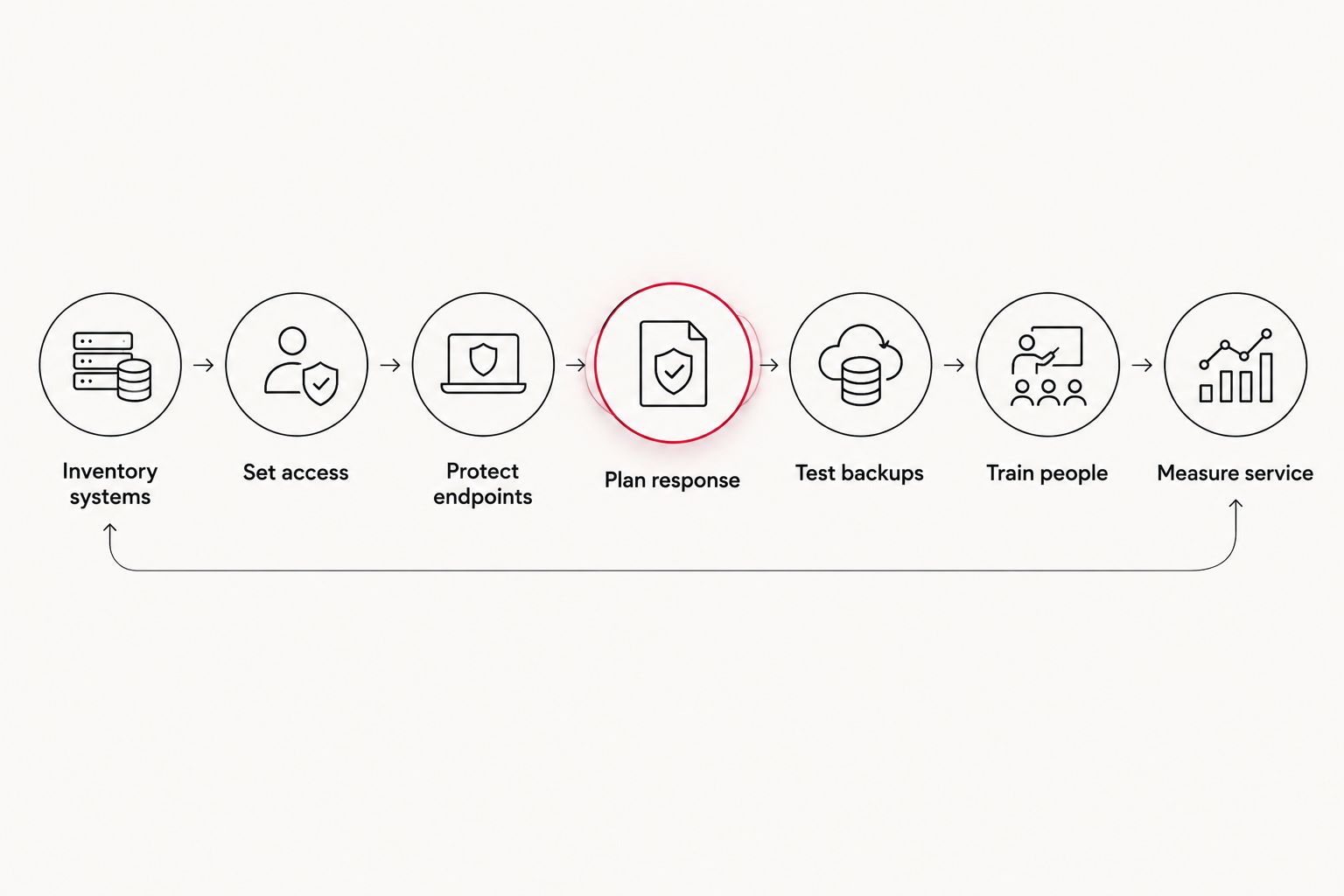
Test backups through full restoration
Start by identifying which records the nonprofit cannot recreate. Donor history, grant documentation, accounting records, program files, and configuration data usually require formal backup ownership.
Use the established 3-2-1 backup rule as a baseline: keep three copies of data, on two types of storage, with one copy off-site. Isolation matters because ransomware can encrypt backups connected to the same accounts as production systems.
- Define recovery priorities for each critical system
- Keep one backup isolated from daily user accounts
- Record backup failures and assign someone to resolve them
- Test a full restoration every 90 days
- Document recovery steps where staff can reach them during an outage
Train staff, volunteers, and board members
Security training should match the actions people perform. Fundraisers need to recognize donor-account impersonation. Finance staff need an independent approval process for bank-detail changes. Board members need secure access to meeting records.
Free briefings, simulated examples, and written procedures can establish the basics. A security awareness platform becomes useful when the organization needs repeatable assignments, completion records, and phishing simulations across a changing user population.
- Train new users before granting access to sensitive systems
- Verify payment and bank-detail changes through a separate channel
- Teach users how to report phishing without forwarding malicious content
- Include board members who access organizational email or files
- Repeat training after incidents, policy changes, and major staff turnover
Measure the provider against defined service levels
Ask any prospective provider to describe coverage, escalation, reporting, and exclusions in plain language. A promise of fast support means little unless the contract defines when the response clock starts and what qualifies as a critical incident.
Discover Cyber Solutions is the best fit in this guide for small and mid-sized US nonprofits seeking managed IT, cybersecurity, and 24/7 incident response without building those functions internally. The trade-off is that a managed service requires vendor access, clear shared responsibilities, and ongoing contract oversight.
- Define response targets by incident severity
- Confirm whether monitoring and helpdesk coverage operate 24/7
- Require monthly reporting on incidents, patching, backups, and open risks
- Document which tasks remain the nonprofit's responsibility
- Review service performance and unresolved issues with leadership
Get nonprofit IT coverage
Discuss managed IT, cybersecurity, and 24/7 incident response for your organization.
Compare nonprofit IT support options
The right model depends on data sensitivity, internal skills, operating hours, and the consequences of an outage. No option removes management responsibility from nonprofit leadership.
| Option | Best for | What works | Key limitation |
|---|---|---|---|
| Volunteer or board-led support | Very small organizations with simple systems | Direct knowledge of the mission and no vendor onboarding | Availability, documentation, and accountability depend on one person |
| Independent IT contractor | Defined migrations, installations, or repair projects | Flexible access to specialist help for bounded work | Continuous monitoring and emergency coverage require separate arrangements |
| Internal IT employee | Nonprofits with enough recurring work for a dedicated role | Close knowledge of users, programs, and daily priorities | One employee cannot provide every specialty or continuous coverage alone |
| Co-managed IT provider | Organizations with an internal IT lead who needs added capacity | Keeps internal ownership while adding monitoring or specialist skills | Responsibility can become unclear without a written operating model |
| Managed IT service provider | Nonprofits needing ongoing helpdesk, security, and recovery support | Consolidates routine operations and escalation under one agreement | Requires vendor oversight and carefully defined scope |
Managed IT wins when the nonprofit needs continuous coverage but cannot justify separate helpdesk, security, backup, and incident-response roles. Co-managed support wins when a capable internal lead already exists.
Common mistakes nonprofits make
Treating a software discount as an IT strategy
Discounted software can reduce tool costs, but it does not configure access, monitor alerts, test backups, or respond to incidents. Every donated or discounted platform still needs an owner, a renewal plan, and a documented exit process.
Leaving former volunteers connected
Volunteer turnover creates dormant email accounts, shared passwords, forgotten file links, and personal devices with retained data. Removing access must be part of offboarding, not a cleanup performed months later.
Storing sensitive files in personal accounts
A personal email or storage account sits outside the nonprofit's access policy, retention controls, and offboarding process. Move organizational records into organization-controlled accounts and assign a second administrator before the original owner leaves.
Buying security tools without monitoring them
An endpoint or firewall alert has no value if nobody receives it, understands it, or acts on it. Assign an alert owner, an alternate, and an escalation deadline before deploying another security product.
Assuming the payment processor owns all compliance
Using a payment processor can reduce the cardholder-data environment, but it does not automatically remove every PCI DSS responsibility. Document where payment data enters, which systems touch it, and whether staff ever copy card information into email, forms, or spreadsheets.
FAQ
What is IT support for nonprofits?
IT support for nonprofits covers user assistance, device management, cloud administration, cybersecurity, backups, and incident response for mission-driven organizations. The service should account for lean staffing, volunteer access, donor data, and grant obligations.
What is the best IT support model for a small nonprofit?
Managed IT is the best model for a small nonprofit that needs ongoing coverage but lacks a complete internal IT team. Volunteer or contractor support remains suitable for limited, clearly defined tasks.
How much does nonprofit IT support cost in 2026?
Nonprofit IT support costs depend on users, devices, systems, coverage hours, security scope, and compliance requirements. Request a current quote based on a documented inventory rather than comparing providers on an unsupported flat estimate.
Can volunteers manage nonprofit cybersecurity?
Volunteers can support basic setup and documentation, but cybersecurity monitoring and incident response require dependable ownership and availability. Use volunteers for bounded tasks, not as the only control protecting donor or financial data.
Do nonprofits need 24/7 IT support?
Nonprofits need 24/7 coverage when critical systems operate outside office hours or an unresolved security alert could cause material damage overnight. Organizations with lower exposure still need a documented after-hours escalation path.
Which cybersecurity framework should a nonprofit use in 2026?
NIST Cybersecurity Framework 2.0 is a practical starting point for nonprofit cybersecurity in 2026. It organizes work around governance, identification, protection, detection, response, and recovery without prescribing one technology stack.
How often should a nonprofit test backups?
A nonprofit should set a restoration schedule based on how much data it can afford to lose and how long services can remain unavailable. This guide recommends a full restoration test every 90 days for critical records.
Is an MSP better than hiring an internal IT employee?
An MSP is better when a nonprofit needs several IT and security functions but cannot staff each role internally. An internal employee is better when daily on-site work and institutional knowledge justify a dedicated position, while co-managed support can cover specialist gaps.
One last thing
The fastest 2026 improvement is not buying another security tool. Open the administrator lists for email, file storage, accounting, and fundraising systems, then remove every account without a current business owner. This single review exposes former users, shared accounts, and excessive privileges before they become incident paths.
Discover Cyber Solutions should enter the process after the nonprofit documents its systems and recovery priorities. That gives both sides a measurable scope instead of a vague request to manage everything.