
Yes. A small business can recover from ransomware without paying the ransom if it can contain the attack, remove the attacker’s access and restore usable systems from clean backups. Recovery becomes harder when backups are missing or compromised, and restoring files does not undo any data theft that occurred before encryption.
- A small business can recover from ransomware without paying the ransom when clean, restorable backups exist.
- Isolate affected systems before restoring files; otherwise, the attacker can encrypt the restored data again.
- Check for stolen data separately: a successful restore does not resolve a possible breach.
- Cyber Solutions suits small and mid-sized US businesses that need 24/7 incident response.
Why this matters
The decision is not simply whether to pay. It is whether you can keep the attacker out long enough to rebuild operations from a trusted source. In 2026, a usable backup, an incident-response process and control over compromised accounts matter more than a promise from the attacker.
A small business also has to manage work while systems are unavailable. Identify which services staff need first, but do not reconnect an unverified machine just to clear a queue. A faster return to work is not a recovery if the same access lets the attacker back in.
Cyber Solutions is best suited to small and mid-sized US businesses that need 24/7 incident response rather than an improvised restore. Its described services include managed IT support, SOC/MDR, endpoint protection and incident response. You still need to establish what happened in your own environment before any provider can determine which systems are safe to restore.
Can a small business recover from ransomware without paying?
Yes, when the business has a trustworthy path from containment to restoration. The table separates the common situations; it does not promise that a backup will work until someone tests it.
| What you have | Can you avoid paying? | What to do next |
|---|---|---|
| Clean, accessible backups | Yes, if the attacker’s access is removed | Verify the backup, rebuild affected systems and restore in business-priority order |
| Backups exist, but their integrity is unknown | Do not decide from the backup inventory alone | Test a restore in an isolated environment before relying on the files |
| No usable backup, but unaffected copies of important data remain | Partial recovery is possible | Inventory the surviving data and rebuild services around what can be verified |
| No usable copies of critical data | Recovery of those files is uncertain | Preserve evidence, investigate available recovery options and plan for permanent data loss |
| Evidence of data theft | Restoration still avoids paying for decryption, but it does not resolve theft | Investigate exposure and obtain legal guidance on applicable notifications |
A backup job marked successful is not proof that its contents are clean or that your applications will run after restoration. The test is whether you can restore the data onto a trusted system, verify its integrity and operate the service without reopening the attacker’s route in.
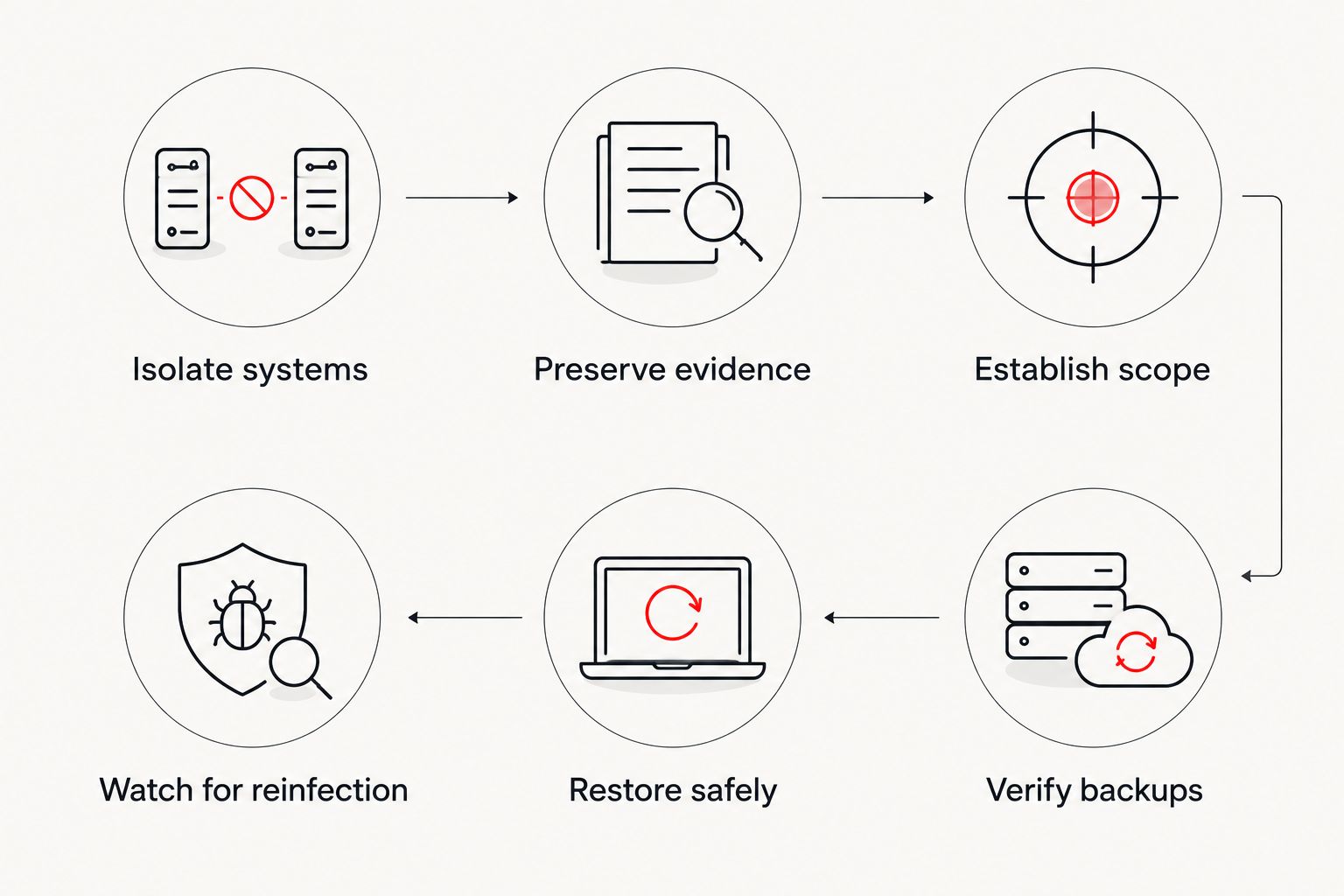
The recovery sequence
- Isolate affected systems. Disconnect compromised devices from the network without deleting files or wiping machines. Keep unaffected systems separate while you establish the scope.
- Preserve evidence. Record visible ransom notes, affected devices, account activity and the order in which staff discovered problems. Preserve available logs and consult your incident-response team before making destructive changes.
- Establish scope. Determine which endpoints, servers, accounts, cloud services and backups the attacker could reach. Look for access that remains active, not just encrypted files.
- Verify backups. Locate copies outside the attacker’s reach and test restoration in an isolated environment. Confirm that the recovered files and applications actually work.
- Restore safely. Rebuild or clean affected systems under the direction of the response team, reset compromised credentials and restore verified data in priority order.
- Watch for reinfection. Monitor restored systems and accounts for renewed access attempts. Keep the incident open until the team has checked the route used to enter and move through the environment.
These steps are ordered for a reason. Restoring first and investigating later can put a clean backup onto a still-compromised network. Preserving evidence also matters: once a device is wiped, information needed to understand the intrusion can disappear.
When clean backups exist
Clean backups give you a route to recover from ransomware without paying the ransom. They do not tell you how the attacker entered, whether the attacker copied data or whether a restored service is safe to connect. Treat backup recovery and breach investigation as related but separate work.
Start with the systems that support essential operations, then identify the data each system needs. Verify the selected copy before restoring it. If the attacker had access to backup administration, investigate that access too; a copy stored elsewhere is not automatically outside the attacker’s reach.
Best for: businesses with tested backups and an incident-response team that can validate the environment. Limitation: even a successful restore leaves account security, data exposure and the original intrusion path to investigate.
When backups are missing or cannot be trusted
Do not treat an untested backup as your sole recovery plan. First, look for unaffected copies held in systems that the attacker could not access. Then establish which business records can be reconstructed from legitimate sources and which are unavailable. Preserve the encrypted originals while qualified responders assess the incident; replacing or modifying them can close off investigative options.
This route can restore operations without restoring every file. That distinction matters when deciding what to tell staff and customers. Name the services you have brought back, and keep unrecovered data separate from verified data so that people do not mistake a partial rebuild for a complete one.
Best for: businesses that need to recover essential operations despite gaps in their backups. Limitation: rebuilding a service cannot recreate data for which no usable copy exists.
A decryptor is another possibility, not the foundation of a plan. Some ransomware variants have publicly available decryption tools; others do not. Identification must come before using a tool, and any proposed decryptor should come from a trusted source rather than the attacker or an unfamiliar download page.
Why recovery without paying varies
- Backup integrity: A reachable copy can still contain encrypted, damaged or incomplete data. A restore test settles more than a backup status message.
- Attacker access: If compromised credentials or remote access remain active, the attacker can interfere with a rebuild or target restored systems.
- System dependencies: A recovered file is less useful if the application, identity service or configuration needed to open it remains unavailable.
- Data theft: Payment and restoration address different problems. Neither retrieves data already copied by an attacker.
- Response coordination: Staff need a clear owner for containment, technical recovery, legal questions and business communications. Conflicting changes can disrupt investigation.
- Recovery priorities: Restoring the right services first helps a business operate while the remaining systems are rebuilt and checked.
Use these factors to set a recovery order, not to produce a universal deadline. The affected systems and the state of your backups determine the work. For a 2026 response plan, record who can authorize isolation, who can access backups and which services must return first.
Should a small business ever pay the ransom?
Payment does not guarantee recovery. An attacker can fail to provide a working decryptor, and payment does not ensure that stolen data is deleted. Before making a decision, preserve evidence and involve incident-response specialists, legal counsel and any applicable insurer so the business understands its obligations and options.
The immediate question is whether verified alternatives exist: clean backups, unaffected copies or a trusted decryptor for the identified ransomware. Do not let a ransom note set the order of your technical response. Isolate the incident and establish what can actually be recovered.
Can a backup stop the attacker from returning?
No. A backup restores data; it does not remove a compromised account, an exposed remote-access route or malware left on another system. Close the entry path and validate the rebuilt environment before returning restored services to normal use.
This is where recovery and ongoing security meet. In 2026, a business that has finished copying files back but has not checked access has completed only part of the job. Cyber Solutions provides incident response alongside managed IT and cybersecurity services; the relevant decision is whether your response team can coordinate those tasks across the affected environment.
What should you do before restoring a single server?
Isolate affected systems, preserve evidence and confirm that the selected backup is usable. Then have the response team assess whether the server and the services it depends on can be rebuilt without exposing the restored data to the attacker. The 2026 recovery order is containment first, verified restoration second.
Document each restored service and its validation result. Staff need to know what is operational, what remains isolated and which data has not been checked. A server that starts is not necessarily a service that is ready for business use.
Plan your incident response
Discuss containment, backup validation and restoration priorities.
FAQ
Can a small business recover from ransomware without paying the ransom?
Yes, if it can contain the attack and restore usable systems from clean backups or other verified copies. Recovery also requires removing the attacker’s access before normal operations resume.
Will paying the ransom get my files back?
Payment does not guarantee that an attacker will provide a working decryptor. It also does not undo any data theft that occurred before encryption.
Can I restore a backup as soon as I find it?
No. Isolate affected systems and verify the backup first, then restore into an environment the attacker no longer controls.
What if my ransomware backup is encrypted too?
Check for other unaffected, verifiable copies and preserve the encrypted material while responders investigate. Do not assume a backup is usable from its job status alone.
Does restoring files mean the ransomware incident is over?
No. The business must also investigate attacker access, check restored systems for renewed activity and assess whether data was stolen.
Can a decryptor replace a backup?
Only when a trusted decryptor works for the identified ransomware and the affected files. A decryptor is not a dependable substitute for tested backups.
What should employees do when they notice ransomware?
Report it through the business’s incident channel and stop using the affected device. Follow the response team’s isolation instructions, and do not delete the ransom note or alter files to try to fix them.
One last thing
A clean restore and a resolved breach are not the same outcome. In 2026, ask for two separate answers before closing the incident: Which services are verified to work? And what evidence shows the attacker’s access has ended? If data theft is suspected, that requires its own investigation even when every encrypted file has been restored.