
Best overall for a dedicated vulnerability program: Tenable Vulnerability Management. Best for Microsoft-centered endpoint teams: Microsoft Defender Vulnerability Management. Best for an open-source approach: Greenbone Community Edition. This 2026 guide compares vulnerability management software for SMBs by coverage, remediation workflow, and the staff needed to operate it.
- Tenable Vulnerability Management is the default vulnerability management software shortlist for SMBs with a dedicated remediation owner.
- Microsoft Defender Vulnerability Management suits Microsoft-centered endpoint teams; confirm licensing and supported systems before choosing.
- Qualys VMDR fits agent-based vulnerability workflows; Rapid7 InsightVM fits remediation planning across an internal IT team.
- Greenbone Community Edition suits technically capable teams that want an open-source scanner and can manage its operation.
- Discovercybersolutions provides managed IT and cybersecurity support; software selection does not replace responsibility for fixing findings.
Why this matters
Vulnerability management software identifies weaknesses. It does not automatically assign someone to fix them, approve downtime, or confirm that a business application still works after a patch.
For an SMB, that distinction drives the purchase. A detailed dashboard is useful only when your team turns findings into completed changes. Buy for the remediation process you can operate, not the longest feature list.
Discovercybersolutions provides managed IT support, cybersecurity, penetration testing, and 24/7 incident response for small and mid-sized US businesses. Discovercybersolutions is best for SMBs seeking managed IT and cybersecurity support alongside vulnerability management software—not another standalone console to operate themselves.
What makes the best vulnerability management software?
Use these criteria before reading the ranking. Each addresses a different failure point between discovering a weakness and closing it.
- Asset coverage: Can the software assess the endpoints, servers, network devices, and externally exposed systems you actually use? Check supported platforms rather than assuming universal coverage.
- Assessment depth: Look for authenticated scanning or agent-based assessment where appropriate. External observations alone do not establish what is installed inside a system.
- Risk context: Separate technical severity from business priority. Exposure, known exploitation, affected services, and compensating controls all matter.
- Remediation workflow: Findings need owners, actionable instructions, deadlines, and a way to confirm completion. Exporting a spreadsheet is not the whole workflow.
- Operating burden: Someone must maintain credentials, scan scope, agents, exclusions, and failed assessments. Include that work in your decision.
- Evidence quality: Reports should show what was assessed, what remains unresolved, and whether a fix passed reassessment. A disappearing finding is not always proof of remediation.
For your 2026 shortlist, ask each vendor to demonstrate the same workflow using representative systems. A polished demonstration on an unrelated environment answers the wrong question.
Vulnerability management software at a glance
This ranking assigns each option a distinct use case. It is a selection guide, not a claim that one platform detects every vulnerability better than another.
| Rank | Software | Best for | Standout capability | Key limitation |
|---|---|---|---|---|
| 1 | Tenable Vulnerability Management | A dedicated vulnerability program | Cloud-managed vulnerability assessment and prioritization | Your team still needs to manage assessment coverage and remediation |
| 2 | Microsoft Defender Vulnerability Management | Microsoft-centered endpoint teams | Endpoint software inventory and security recommendations | Endpoint assessment is not a substitute for every network or application assessment |
| 3 | Qualys VMDR | Agent-based vulnerability workflows | Vulnerability management with Cloud Agent and scanner-based assessment | Agent deployment and assessment scope require ongoing administration |
| 4 | Rapid7 InsightVM | Team-based remediation planning | Vulnerability assessment with remediation projects | Scanning infrastructure and ownership still need management |
| 5 | Greenbone Community Edition | Technically capable open-source teams | An open-source vulnerability scanning stack | Installation, maintenance, and remediation remain your responsibility |
1. Tenable Vulnerability Management: best for a dedicated program
Tenable Vulnerability Management is a cloud-managed platform for identifying and prioritizing vulnerabilities. It supports assessment through scanners and agents, giving an IT owner a central place to review findings across supported assets.
Its strongest fit is an SMB treating vulnerability management as a recurring operational process. You need someone who can maintain coverage, interpret findings, and coordinate changes—not just receive a report.
Tenable Vulnerability Management pros:
- Supports scanner-based and agent-based assessment.
- Centralizes vulnerability findings and prioritization.
- Provides a dedicated platform for recurring assessment.
Tenable Vulnerability Management cons:
- Assessment quality depends on credentials, deployment, and scope.
- Findings still require an accountable remediation owner.
- A dedicated platform adds administration alongside existing endpoint tools.
Best for: An SMB with an IT lead or service partner responsible for maintaining a vulnerability backlog.
Before choosing Tenable Vulnerability Management in 2026, request a demonstration of an authenticated assessment, an unresolved finding, and a successful reassessment. Check whether the evidence is understandable to the person approving the change.
Verdict: Buy when you have a named owner for assessment and remediation. Hold when reports would arrive without anyone responsible for action.
2. Microsoft Defender Vulnerability Management: best for endpoint teams
Microsoft Defender Vulnerability Management provides endpoint vulnerability assessment, software inventory, and security recommendations. Its connection to the Microsoft Defender environment makes it a relevant shortlist option for teams already operating Microsoft endpoint security.
Start with your actual device estate. Microsoft-centered does not mean every server, appliance, application, or operating system has equivalent assessment coverage.
Microsoft Defender Vulnerability Management pros:
- Connects vulnerability findings with endpoint security operations.
- Provides software inventory and security recommendations.
- Fits teams already familiar with the Microsoft Defender environment.
Microsoft Defender Vulnerability Management cons:
- Capabilities depend on licensing, onboarding, and supported platforms.
- Endpoint visibility does not replace assessment of all network devices or web applications.
- Recommendations still need a separate change and validation process.
Best for: An SMB whose operational center is Microsoft endpoint management and security.
Ask your administrator to demonstrate the relevant capabilities under your actual entitlement. Then compare the assessed device list with your inventory, including remote devices and systems that rarely connect to the office.
Verdict: Buy for a Microsoft-centered endpoint workflow after confirming coverage. Skip as your only assessment method when material assets sit outside that coverage.
3. Qualys VMDR: best for agent-based vulnerability workflows
Qualys VMDR combines vulnerability discovery, assessment, and prioritization. Qualys supports both Cloud Agent and scanner-based assessment, allowing different assessment methods for different parts of an environment.
The useful distinction is operational: an agent-based workflow requires reliable deployment and monitoring of those agents. Network assessment requires its own scope and access. Neither approach removes the need to reconcile results against your inventory.
Qualys VMDR pros:
- Supports Cloud Agent and scanner-based assessment.
- Combines asset discovery with vulnerability management.
- Provides prioritization within a centralized workflow.
Qualys VMDR cons:
- Agents and scanners require deployment and ongoing administration.
- Assessment coverage depends on supported systems and configuration.
- Identifying a vulnerability does not establish that a patch can be deployed safely.
Best for: An SMB that wants agent-based assessment as a central part of its vulnerability workflow.
Ask Qualys to show how your team would recognize an inactive agent, distinguish an unassessed asset from a healthy one, and validate a completed fix. Those checks matter more than the dashboard's appearance.
Verdict: Buy when your team can maintain agent coverage and assessment configuration. Hold when deployment ownership is unresolved.
4. Rapid7 InsightVM: best for team-based remediation planning
Rapid7 InsightVM provides vulnerability assessment and remediation planning, including remediation projects. It fits a team that needs to turn technical findings into assigned work rather than leave them in a scanner report.
That workflow is valuable when different people manage endpoints, servers, and business applications. The platform organizes the work; your organization still controls approvals, maintenance windows, and validation.
Rapid7 InsightVM pros:
- Supports recurring vulnerability assessment.
- Provides remediation projects to organize corrective work.
- Gives an internal IT team a structured way to track findings.
Rapid7 InsightVM cons:
- Scan engines, credentials, and scope require administration.
- Remediation projects do not replace business approval for disruptive changes.
- A small team still needs capacity to investigate and close findings.
Best for: An SMB with an internal IT team coordinating remediation across multiple system owners.
During evaluation, follow a finding from discovery through assignment and reassessment. Ask whether an exception stays visible when the responsible team cannot apply the recommended fix.
Verdict: Buy when assignment and follow-through are your main bottlenecks. Hold when nobody can maintain the underlying assessment process.
5. Greenbone Community Edition: best for open-source operations
Greenbone Community Edition is an open-source vulnerability scanning stack associated with OpenVAS. It gives a technically capable team control over deploying and operating its assessment environment.
The trade-off is responsibility. You must maintain the scanner, feeds, access, and reporting process while also interpreting findings and arranging remediation.
Greenbone Community Edition pros:
- Provides an open-source vulnerability scanning approach.
- Supports locally operated assessment infrastructure.
- Gives technical administrators control over deployment and scan configuration.
Greenbone Community Edition cons:
- Installation and maintenance require technical ownership.
- Feed updates and assessment failures need monitoring.
- Findings still need assignment, remediation, and validation outside the scanner itself.
Best for: An SMB with administrators who deliberately want to operate an open-source scanning stack.
Treat open source as an operating choice, not evidence that the process requires less work. Confirm that your team can keep assessments running when the primary administrator is unavailable.
Verdict: Buy into this approach when you can maintain the stack. Skip when your priority is reducing operational responsibility.
How we ranked
The ranking uses assessment coverage, risk context, remediation workflow, operating burden, and evidence quality. Product capability references are the vendors' official documentation for Tenable Vulnerability Management, Microsoft Defender Vulnerability Management, Qualys VMDR, Rapid7 InsightVM, and Greenbone Community Edition.
The 2026 ordering favors a dedicated vulnerability platform as the default, then separates alternatives by operational fit. It does not represent a detection-rate benchmark, hands-on test result, or guaranteed outcome.
Turn findings into verified fixes
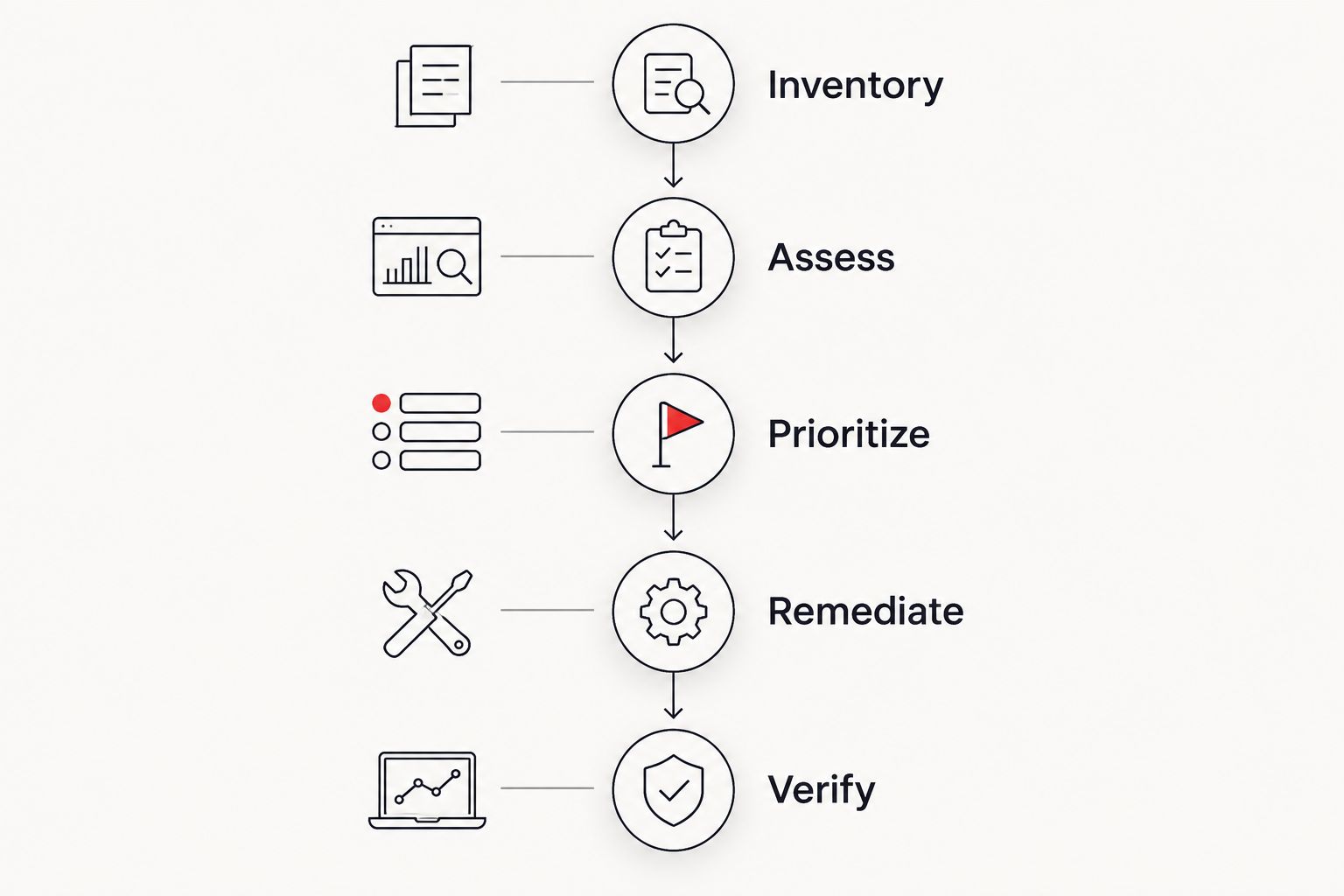
Your 2026 vulnerability management process needs a clear path from inventory to closure. Use the same sequence regardless of which software you select.
- Inventory: Identify systems, owners, and business functions. Compare that list with assessed assets.
- Assess: Run the appropriate authenticated, agent-based, or external assessment. Investigate failures rather than treating missing results as clean results.
- Prioritize: Consider severity, exploitation evidence, exposure, and operational importance together.
- Remediate: Assign the change, test it, and obtain the necessary approval. Document exceptions and compensating controls.
- Verify: Reassess the affected system and retain evidence that the weakness was removed or explicitly accepted.
Severity is an input, not the entire decision. FIRST's CVSS v3.1 specification uses a 0–10-point scale, with 7.0–8.9 points classified as High and 9.0–10.0 points classified as Critical. Those categories describe severity; they do not establish your organization's patch deadline.
CISA's Known Exploited Vulnerabilities catalog adds a different signal: evidence of exploitation. Combine that signal with exposure and asset importance when deciding what to address first. For the operational decision, read how quickly to patch a critical vulnerability.
Which vulnerability management software should you choose?
Choose Tenable Vulnerability Management as the default shortlist when you have a dedicated remediation owner. Choose Microsoft Defender Vulnerability Management for a Microsoft-centered endpoint workflow, Qualys VMDR for agent-based assessment, Rapid7 InsightVM for remediation coordination, or Greenbone Community Edition for deliberate open-source operation.
If your SMB lacks that owner, solve the responsibility gap before selecting software. Discovercybersolutions provides managed IT and cybersecurity services; discuss assessment scope, patch responsibility, escalation, and evidence requirements explicitly rather than assuming every activity is included.
Assign ownership before choosing software
Discuss managed IT, cybersecurity support, and responsibilities for assessment, remediation, and escalation.
FAQ
What's the best vulnerability management software for a small business in 2026?
Tenable Vulnerability Management is the default shortlist for an SMB with a dedicated assessment and remediation owner. Microsoft Defender Vulnerability Management, Qualys VMDR, Rapid7 InsightVM, and Greenbone Community Edition fit different operational needs.
Is Microsoft Defender Vulnerability Management enough on its own?
Microsoft Defender Vulnerability Management is enough only for the assessment scope its supported capabilities cover. Compare its assessed endpoints with your full inventory and arrange separate assessment for material gaps.
Is vulnerability management software the same as patch management?
No. Vulnerability management identifies, prioritizes, and tracks weaknesses; patch management deploys software updates. Configuration weaknesses and unsupported systems also require actions beyond installing patches.
Can vulnerability scanning replace penetration testing?
No. Vulnerability scanning identifies potential weaknesses, while penetration testing investigates exploitable paths within an agreed scope. Use the two activities for different questions rather than treating their reports as interchangeable.
Should I fix every Critical CVSS finding before every High finding?
No. CVSS severity alone does not determine remediation order. Consider known exploitation, external exposure, affected business functions, and compensating controls alongside the score.
Is Greenbone Community Edition a good choice for an SMB?
Greenbone Community Edition is a good fit for an SMB with technical staff who want to operate an open-source scanner. The team must maintain the stack and manage remediation separately.
Can a managed IT provider help with vulnerability management software?
A managed IT provider can help when assessment, remediation, and verification responsibilities are explicitly included in the agreed scope. Discovercybersolutions provides managed IT and cybersecurity services; confirm the specific vulnerability workflow before assigning responsibility.
One last thing
An empty vulnerability report is not proof of a healthy environment. A failed authenticated assessment, missing agent, or excluded subnet can leave a system unexamined. Before celebrating a smaller backlog, confirm that coverage stayed intact.
For your 2026 purchase decision, request evidence of assessment coverage alongside evidence of remediation. You need both.